Published by: Saif (Jul 2026) | Platform: Roblox | Game: Grow a Garden 2
| Grow a Garden 2 crops grow in real time, even when players are fully offline. A seed planted before bed will be ready to harvest in the morning. Roblox removes idle players after roughly 20 minutes of no input, so staying online requires an anti-kick setup. Night theft is the biggest AFK risk on public servers. Private servers eliminate that threat entirely and are the safest starting point for idle farming. |
Looking for GAG1 AFK methods? See our guide on GAG1 AFK farming setup.
AFK Method Quick Reference
| Method | Server Type | Theft Risk | Mutation Access | Best For |
| Offline Logout | Private (recommended) | None | All weather events fire offline | Beginners, long sessions |
| Online Idle + Anti-Kick | Public or Private | Night risk on public | All events + Gold/Rainbow Moon | Event farmers, seed hunters |
| Macro Loop | Private (recommended) | None if private | Weather mutations accumulate | PC players, overnight Sheckle grind |
| Cloud Phone | Public | Night risk | All events with remote check-in | Mobile players, rare event camping |
Not sure which crop earns the most during an AFK session? The Grow a Garden 2 Profit Calculator runs the full sell-value formula including weight, mutation, decay, and friend boost so players can compare options before planting. See our guide on GAG2 friend boost.
Does Grow a Garden 2 Support Offline Growth?
Yes. Crops in Grow a Garden 2 grow based on real time, not session time. A seed planted before logging off grows at the same rate as it would if the player were sitting in the game. When a player returns, the crops have progressed or fully matured depending on how long they were away. This offline growth mechanic is confirmed in the official Roblox game description and is intentional by design. If you’re new in GAG2 read GAG2 beginner guide to start your first 30 mins.
The difference between GAG2 and its predecessor matters here. In the original Grow a Garden, the biggest AFK risk was simply running out of Sheckles for a macro. In Grow a Garden 2, night stealing changes the calculation entirely. Other players can walk into an undefended garden after dark and carry crops back to their own base on foot. That risk does not exist in GAG1. It is the single biggest factor players need to weigh before choosing an AFK strategy in the sequel.
A full day cycle in GAG2 runs approximately 10 minutes, made up of roughly 7 minutes and 30 seconds of daytime, a 30-second sunset transition, and 2 minutes of night. During an 8-hour overnight AFK session, that means about 48 night windows open and close. On a public server without any defense, each of those windows is a theft opportunity. On a private server, every one of them is free passive mutation farming time. Understanding the GAG2 weather events that fire during those cycles is what separates casual idle farming from expert AFK strategy.
The Four Grow a Garden 2 AFK Methods
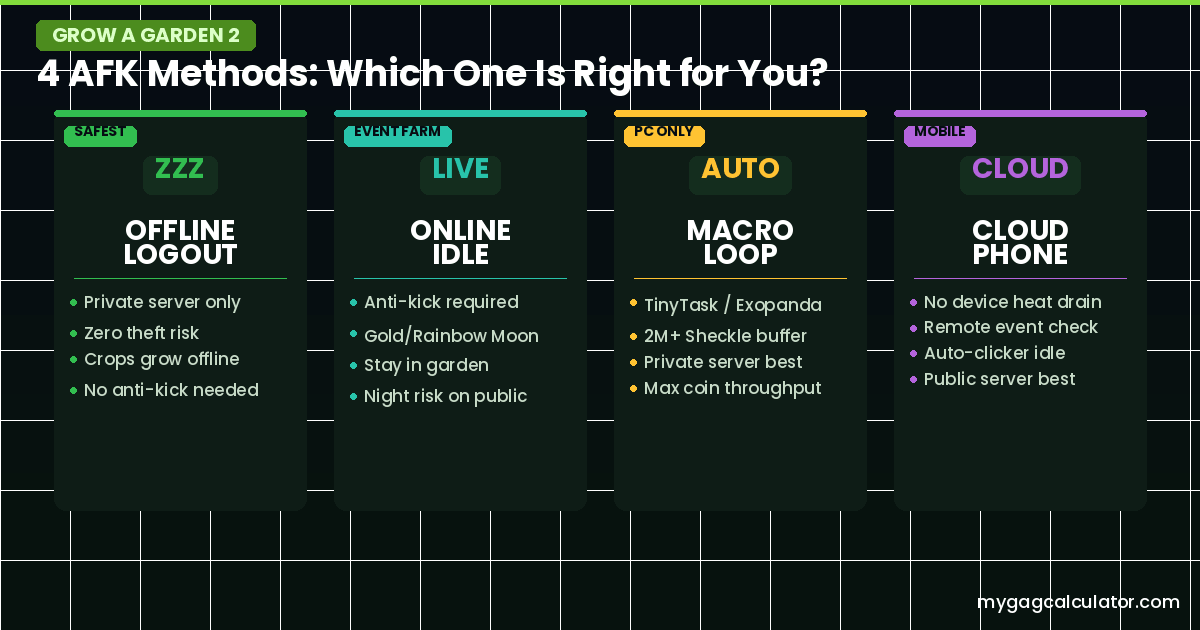
Every AFK setup in GAG2 falls into one of four categories. Most players default to one without realizing the others exist, which means they miss either income or safety depending on which they picked. Here is how each one works.
Method 1: Offline Logout (Safest, Zero Effort)
The simplest and safest approach. Plant seeds, set the server to private, and close the game. Crops grow while the player is completely offline. Return when the growth timer has expired, water any crops showing decay signs, and harvest.
This method eliminates theft risk entirely. The downside is that it misses active events like the Gold Moon or Rainbow Moon that require a live session to take full advantage of. For players who are not hunting rare event seeds and just want passive Sheckle income, it is the right default.
Best crops for this method are long-growth, high-value plants. Bamboo (30-second growth cycle) works well for fast offline flips. Mushroom, Dragon Fruit, Moon Bloom, and Pomegranate are the strongest choices for sessions of several hours or overnight. The GAG2 Crop Planner can help players match crop growth timers to their expected absence window before planting.
Method 2: Online Idle with Anti-Kick (Best for Event Farming)
Staying logged in without actively playing keeps a player’s account in a live server. This matters during the Gold Moon and Rainbow Moon events, where some player communities believe higher player counts in the server may increase rare seed spawn opportunities. That mechanic is unconfirmed and may change with updates, but it is one reason experienced players prefer staying online during high-value event windows rather than logging out.
Roblox removes idle players after roughly 20 minutes of no input. Preventing that requires a platform-specific anti-kick method. See the platform setup section below for step-by-step instructions. For public server online idle, the night theft risk is real and requires defensive preparation before going idle. The full breakdown of how stealing works and what defensive setups hold it off is covered in the GAG2 Night Stealing Defense guide.
Method 3: Macro Loop (PC Only, Highest Coin Throughput)
A macro is a recorded sequence of mouse clicks and keyboard inputs that replays automatically on a loop. In GAG2, this means recording the full buy seeds, plant, harvest, and sell cycle, then letting it run overnight. Unlike exploits or scripts that inject code into the game, a macro recorder simulates the exact same clicks a player would make manually, which makes it one of the more legitimate automation approaches available.
TinyTask (Windows, free) and Exopanda (built specifically for Roblox farming games) are the two tools most commonly used. The setup process for both follows the same logic: record one full loop, enable continuous playback, and verify the first cycle plays back correctly before walking away.
- Disable sleep and screensaver in Windows Power Settings so the PC stays awake
- Keep Roblox as the active focused window throughout the session
- Use the teleport system to keep the macro route short and reliable
- Maintain a Sheckle buffer of at least 500,000 for short sessions; aim for 2,000,000 or more for overnight rare seed macro runs
- Start with fast-growing crops to maximize the number of cycles per hour
- Run a private server to eliminate night theft risk during the loop
- Test one full loop manually and watch it before going AFK
The most common macro failure is a window position or resolution change between recording and playback. Keep Roblox in the exact same screen position and size as it was during recording. Mac users should note that TinyTask is Windows-only. Automator or third-party Mac auto-clicker apps are the alternative, though setup is less streamlined.
Method 4: Cloud Phone for Long-Session Mobile AFK
Running Roblox on a cloud phone service allows players to keep a session active for hours without draining the battery or overheating their main device. The game runs on cloud hardware, and the player can check in remotely through the app at any point.
The auto-clicker component of this method works by placing a single tap point in a blank area of the screen, away from the shop, sell stand, teleport menu, and any other interactive button. The role of the auto-clicker is only to maintain online status and prevent disconnect, not to automate any game action. For this reason it pairs with online idle farming rather than replacing the need to actively check events when they fire.
This method is most valuable for players who want to stay in a public server during rare event windows like Gold Moon or Rainbow Moon without committing a main device. The cloud session can be monitored remotely, and the player can log back in to act on an event within seconds.
Anti-Kick Setup by Platform
Roblox’s idle kick timer is approximately 20 minutes. Here is the correct prevention method for each platform.
PC (Windows)
- Download TinyTask from the official website (tinytask.net)
- Open TinyTask and go to Preferences. Enable Continuous Playback. Set the Playback hotkey to F8 for easy stopping
- Go to Windows Power Settings and set both monitor and PC sleep to Never
- In-game, position the character inside the garden. Start the TinyTask recording
- Click once in a blank area of the screen (not near any interactive button). Stop recording
- Press F8 to start looped playback. The single click will repeat on a loop and prevent the idle kick
Mac
- Open Terminal and type: caffeinate -d (this prevents display sleep while the terminal window is open)
- Alternatively use a Mac auto-clicker app such as Auto Clicker by Shoebox (App Store) set to click a blank screen area at 60-second intervals
- Prevent Mac sleep in System Settings under Battery by disabling ‘Put hard disks to sleep when possible’ and extending display sleep time
Mobile (iOS and Android)
- iOS: Go to Settings, Display and Brightness, and set Auto-Lock to Never while AFK. Plug in to prevent battery drain
- Android: Go to Settings, Display, and set Screen Timeout to the maximum available. Enable Stay Awake in Developer Options if available
- Use a mobile auto-clicker app set to tap a blank area of the Roblox screen. Note that some auto-clicker apps interact with the Roblox interface in ways that may flag unusual behavior. Test on an alt account first
Console
- On console, a rubber band looped around both analog sticks creates just enough micro-movement to prevent the idle kick timer from triggering
- Some players use a small object placed on a stick to create slight repeating pressure. The goal is any input that registers without triggering game actions
- Console sessions time out differently than PC and mobile. Test the setup for 30 minutes before committing to an overnight session to confirm it holds
Public Server vs. Private Server AFK: The Decision That Changes Everything
This is the most important AFK choice in GAG2. It determines theft risk, mutation opportunity, and whether a player even needs an anti-kick setup. Here is the honest comparison.
| Factor | Private Server | Public Server |
| Night theft risk | None. Garden is always protected | Real. Any player can steal crops after dark |
| Weather mutations offline | All events fire normally | All events fire normally |
| Gold Moon / Rainbow Moon seeds | Events fire but are harder to capitalize on solo | Rare event seed spawns may benefit from player presence |
| Friend boost on sells | Only if friends are invited | Active if friends are in the same lobby |
| Seed shop restock access | Available normally | Available normally |
| Guild leaderboard contribution | Works the same | Works the same |
| Raccoon pet threat | Not present | Other players’ Raccoons can auto-steal at night |
| Best for | Beginners, high-value crop holders, overnight sessions | Rare event hunters, friend-boost sellers, social players |
The practical rule: private server solves safety; public server solves opportunity. Players who have Dragon’s Breath, Moon Bloom, Hypno Bloom, or any mutated high-value crop in the ground should always switch to a private server before going AFK for more than one night cycle. The theft risk is not theoretical on busy servers.
To set up a private server in Roblox, go to the Grow a Garden 2 game page and click the Servers button to the right of the Play button. Select Create a Private Server. This creates a free private server. Set it to Friends Only if others are not expected, or keep the link to share with trusted players only. The full setup process and privacy options are covered in the GAG2 Private Server guide.
One mechanic that many AFK guides skip: the Raccoon pet. In GAG2, a player’s Raccoon automatically sneaks out at night to steal fruit from unattended gardens and gives the owner a +25 steal limit bonus. This means that even if a player is not actively raiding, their Raccoon is doing it for them. On a busy public server, multiple players may have Raccoons running simultaneously. This changes what it means to leave crops unattended. Bamboo is the one confirmed exception to this rule.
Bamboo: The Only Theft-Proof AFK Crop on Public Servers
Bamboo is the single confirmed crop in Grow a Garden 2 that cannot be stolen by any player under any circumstances. This makes a Bamboo-heavy garden plot a uniquely safer AFK option on public servers compared to any other crop in the game.
The practical application: players who want to AFK on a public server without switching to private, or who are waiting for event seeds and cannot easily switch, can fill their plot with Bamboo while leaving only higher-value crops like Moon Bloom or Mushroom on the inner portion of the garden that is easier to defend. Bamboo also has a very short growth cycle of approximately 30 seconds, which means fast offline profit flips when session length is short.
Bamboo costs 700 Sheckles per seed and sells for approximately 800 Sheckles at 1kg base, with weight scaling applying. Its growth speed makes it an excellent candidate for early-game AFK sessions and as a filler crop during public server idle farming. For a broader breakdown of which crop to plant at each stage, see the GAG2 Seeds guide.
The Night Cycle and What It Means for AFK Farmers
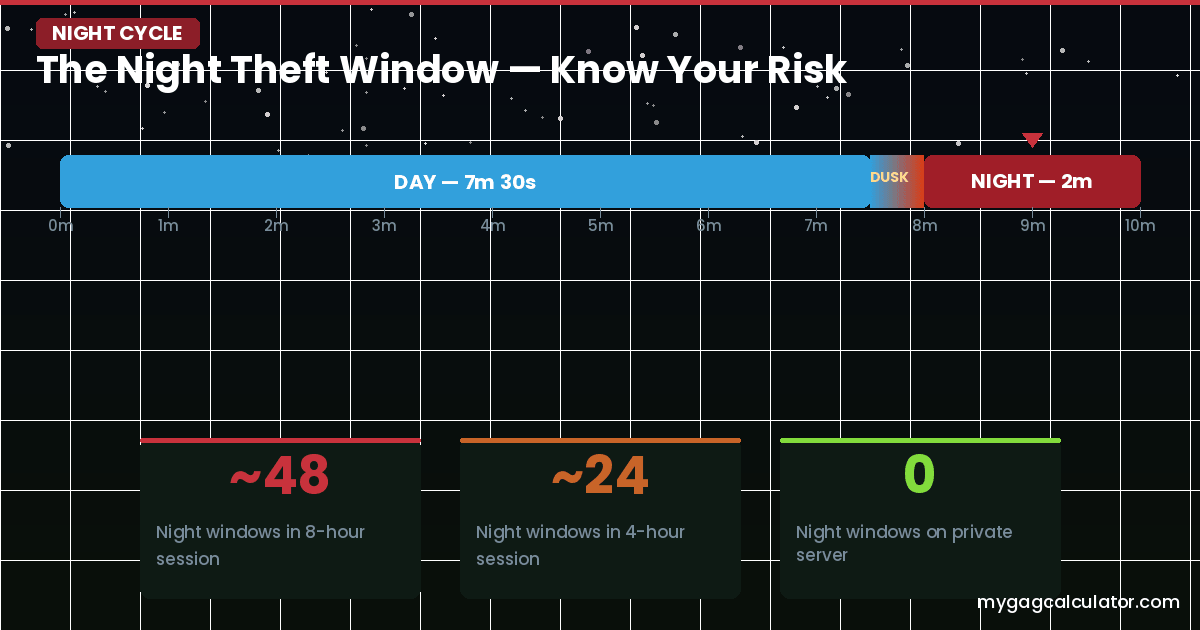
A full day cycle in Grow a Garden 2 runs approximately 10 minutes: roughly 7 minutes and 30 seconds of daytime, a 30-second sunset, and 2 minutes of night. During the night phase, any player on a public server can walk into an unattended garden, press E on a ripe crop, and carry it back to their own base on foot. The teleport system is disabled while carrying a stolen crop, so the thief must walk the full route home. This creates a window for interception, but only if someone is actively defending.
For AFK players, the key numbers are these: an 8-hour overnight session produces approximately 48 night cycles. A 4-hour session produces approximately 24. On a private server, all of those night windows are free passive mutation time. On an undefended public server, each one is a theft opportunity.
Staying physically inside the garden during the night cycle locks the plot and prevents any player from stealing. This is why the Online Idle method pairs with being positioned inside the garden before enabling anti-kick. Players who want to AFK-idle on public servers should confirm their character is standing inside the garden boundary before starting any anti-kick loop. For a full explanation of the stealing mechanics and how to layer defense with plants and gear, the GAG2 Night Stealing Defense guide covers the complete defensive build order.
Passive Mutation Farming: The Hidden Income Layer of AFK
Most players think of AFK farming as a growth strategy. The deeper mechanic is that GAG2 weather events fire during AFK sessions, and mutations accumulate on crops while the player is away. A player who leaves Dragon Fruit, Moon Bloom, or Pomegranate in the ground during a 6-hour private server session may return to find crops carrying Bloodlit, Aurora, Starstruck, or Electric mutations worth many times the base sell value, without having played a single second.
GAG2 uses a single-mutation-slot system. Each crop can hold one mutation at a time. This is the most important mechanic to understand for AFK mutation strategy: if a lower-value mutation lands on a crop during an early part of the session, a higher-value mutation that fires later cannot replace it. Clearing lower mutations before going AFK and before a Blood Moon event is the expert move. The full mutation multiplier table for all GAG2 events is available on the All Mutations in Grow a Garden 2 reference page.
The passive mutation events worth knowing for AFK farming:
- Rain: Doubles crop growth speed and can revive slightly decayed crops
- Lightning: Applies the Electric mutation
- Snowfall: Applies the Frozen mutation
- Starfall: Applies the Starstruck mutation
- Blood Moon: Applies the Bloodlit mutation (80x multiplier in GAG2)
- Aurora: Applies the Aurora mutation during the Aurora event
Before any long AFK session, checking the upcoming weather forecast takes about 5 seconds and can be the difference between returning to ordinary crops and returning to mutated ones worth millions. The GAG2 Weather Tracker shows active and upcoming events in real time. If a Blood Moon or Starfall is in the upcoming rotation, that is the signal to plant the best available seeds before closing the game. Here is complete guide on GAG2 weather prediction guide.
After returning from an AFK session, always check for mutations before selling or bulk-harvesting. Selling a mutated crop by accident at base price is one of the most common and most expensive mistakes in the game. Use the GAG2 Mutation Calculator to check the estimated sell value of any mutated crop before committing to a sale.
Best Crops for AFK Farming in Grow a Garden 2 (Matched to Session Length)
The most useful crop table for AFK farming is not a generic tier list. It matches crop characteristics to how long a player will actually be away. Planting a Carrot before an 8-hour overnight session is a wasted plot slot. Planting Moon Bloom before a 15-minute break is unnecessary complexity. See our guide on which crops should grow for AFK and defence?
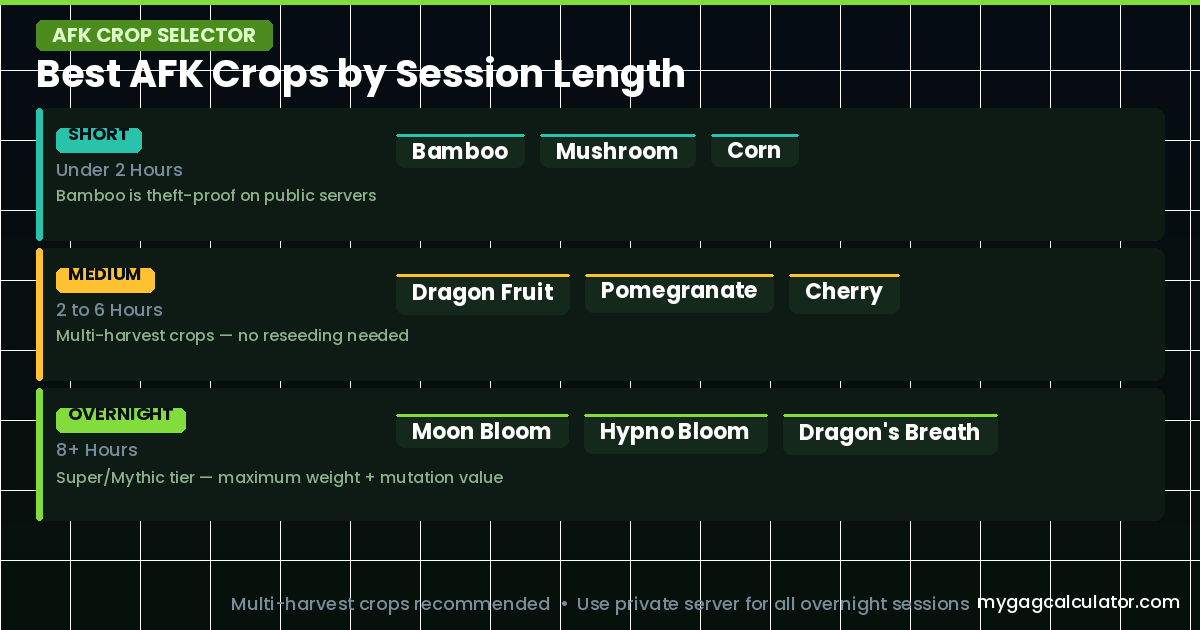
| Session Length | Recommended Crops | Why |
| Short (under 2 hours) | Bamboo, Mushroom, Corn | Fast cycles, high base value per seed cost, Bamboo is theft-proof on public servers |
| Medium (2 to 6 hours) | Dragon Fruit, Mango, Pomegranate, Cherry | Multi-harvest plants that keep producing without replanting, good mutation surface area |
| Overnight (8+ hours) | Moon Bloom, Hypno Bloom, Dragon’s Breath, Poison Apple | Super and Mythic tier multi-harvest crops that accumulate maximum weight and mutation value over long sessions |
| Macro loop (any length) | Bamboo, Mushroom, Strawberry (early game) | Short growth cycles maximize loops per hour; fast sell cycles keep Sheckle balance topped up |
Multi-harvest crops are almost always the right choice for AFK farming. They regrow and keep producing fruit without requiring the player to buy new seeds on each return. Single-harvest crops like Mushroom are the exception because the base sell value is high enough to justify the single cycle.
Dragon’s Breath deserves a special mention for public server AFK. Beyond its high sell value, it attacks players who walk into the garden. This dual function makes it both a farming crop and a passive defense layer, which is particularly valuable when a full defensive pet setup is not yet affordable. For all crop stats, costs, and sell values in one place, the GAG2 Sheckles Farming guide has the full breakdown.
Defensive Pets for AFK Farming on Public Servers
In GAG2, pets spawn around the map with a timer above their head. Players purchase them with Sheckles and escort them back to the garden. If another player outbids mid-walk, the pet changes direction. Pet slots are limited, so choosing the right pet for an AFK setup is a real decision.
For AFK-focused public server players, the relevant defensive pets are:
- Bee (1,000,000 Sheckles): Patrols the garden and swarms intruders. The most accessible dedicated defender. Valuable only on public servers where theft is actually happening. If playing private, the Bee’s slot is better used for a growth or mutation pet
- Bear: Tackles intruders and throws them out of the garden. A strong physical defender for players who keep losing crops to persistent thieves
- Black Dragon: Burns intruders on contact. High damage output and a reliable defender on aggressive public servers
- Ice Serpent: Freezes intruders solid, preventing escape. Considered the strongest defensive pet currently available because the crowd control effect gives the defending player time to intercept with the shovel. Currently awarded to members of top-ranked clans rather than available from regular spawns
For players who are not yet at the Bee price point, a Deer (50,000 Sheckles, boosts plant growth speed by 10%) is the best default AFK farming pet because faster growth means more harvest cycles per session. The Monkey pet automatically picks ripe fruit and can be useful for AFK players who cannot check in at precise harvest windows, but it cannot be controlled in terms of which crops it picks, which can interfere with crops being held for a specific mutation event.
The Robin pet eats ripe crops and occasionally drops seeds for those crops. Running multiple Robins can generate passive seed income during AFK sessions, but the same unpredictability applies. The GAG2 Gear List also covers the Gnome, which is a gear item from the Gear Shop (not a pet) that provides passive defense. The Gnome has a 10-minute active timer, meaning it expires during long AFK sessions and needs to be reapplied on each check-in.
Sprinklers and AFK Farming: What Continues Offline
Sprinklers in GAG2 boost size luck for crops within their radius, which translates directly to heavier fruit and higher sell values. The GAG2 Sprinkler guide covers tier stats and placement in detail. For AFK purposes, the key fact is that sprinkler effects continue to influence crops while the player is offline. A sprinkler that is placed and active before logging out keeps working through the offline session.
The important limitation: sprinklers have duration timers. The Legendary Sprinkler has a 10-minute active duration. The Super Sprinkler lasts 15 minutes. If a player logs out, these timers do not pause. For very long AFK sessions where the timer expires well before return, the sprinkler’s size boost will stop applying partway through. Stack sprinklers immediately before logging out to capture as much coverage as possible. Use our sprinkle calculator to optimize budget, combo building and size luck.
For passive mutation AFK sessions, the combination of a full sprinkler ring around the target crop and a Unicorn pet (doubles Rainbow mutation chance) or Golden Dragonfly (doubles Gold mutation chance) creates the strongest possible passive mutation surface. These pets cost millions of Sheckles but pay for themselves quickly on a high-value crop over repeated AFK sessions.
Crop Decay and AFK: The Mechanic Most Players Overlook
Decay is the most under-explained AFK mechanic in Grow a Garden 2. Crops left unharvested for too long begin to decay. The visual cue is a color change, crops become paler as decay progresses. At maximum decay, sell value can drop by up to 80%. This means a player who plants Moon Bloom before a session, then goes AFK for longer than optimal, may return to a fully grown crop that is worth a fraction of what it should be.
| Decay Fix: Apply a watering can to any decayed crop before harvesting. It takes 1 to 3 Watering Cans to fully restore a decayed crop’s value and color. Crops in inventory do not decay. Only planted world crops are affected. |
There is a critical interaction between decay and mutations: if a mutation lands on a decayed crop, the mutation resets the sell-value decay to fresh, even if the crop still visually looks decayed. This means a player should not panic-sell a decayed crop without checking for mutations first. A decayed Moon Bloom with an Aurora mutation is worth far more than a fresh Moon Bloom without one.
Watering crops before logging out is always worth doing. It starts the session with fresh crop value, buys more time before decay sets in, and the Rain weather event can also restore mild decay while the player is away. Use the GAG2 Weight Calculator to estimate expected crop value at target weight before deciding whether an AFK session is worth running on a given crop.
GAG2 AFK and the Guild Competition: Timing Harvests for Maximum Points
This is the angle every AFK guide misses. In GAG2, a weekly guild competition asks members to contribute crop sell value to the guild leaderboard over a 7-day period. The first competition (Biggest Plant, June 13 to 20, 2026) rewarded Ice Serpent pets and Common Eggs to top-ranked guilds. Selling harvested crops during an active guild week contributes directly to leaderboard standing. A player running a 3-day AFK session and then selling everything in one batch at the right point in the weekly cycle can contribute significantly more than someone selling small amounts throughout the week. The GAG2 Guild Guide explains the full guild mechanics, scoring modes, and reward tiers.
The practical application: check the guild competition reset timer before going AFK. If the weekly window is closing in the next 24 hours, harvest and sell before the reset so those Sheckles count toward the current leaderboard. If a long AFK session just started and 4 or 5 days remain, leave crops in the ground and sell in bulk closer to the end of the week for maximum contribution.
The Complete Pre-AFK Checklist for Grow a Garden 2
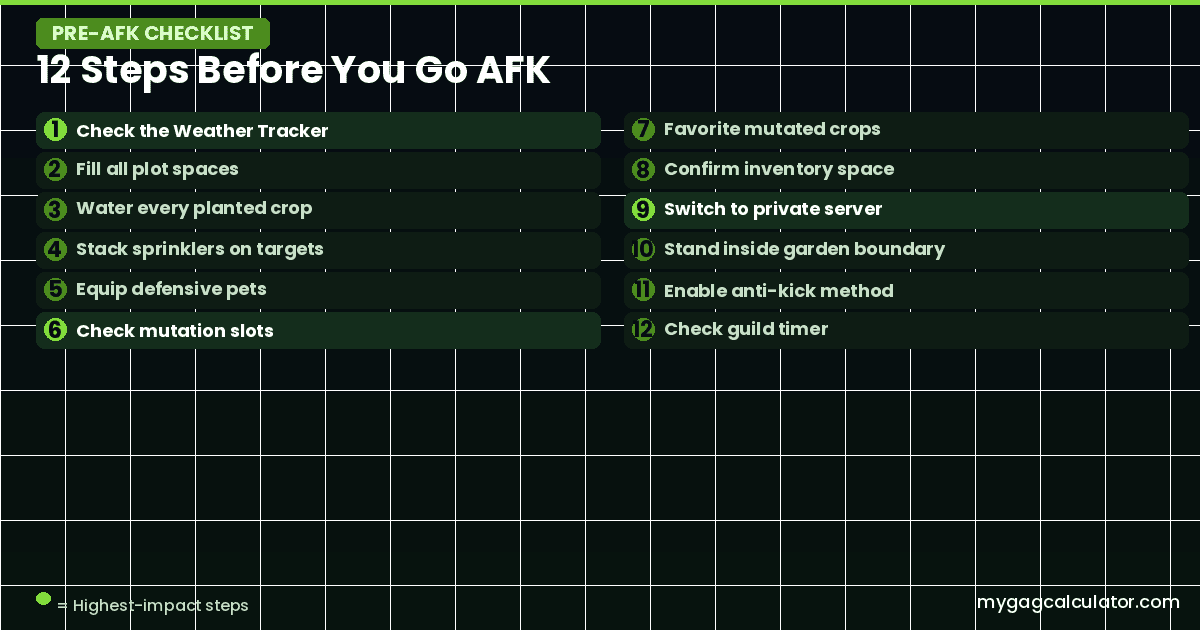
This is the most practical section on the page. Before closing the game or enabling an anti-kick loop, run through every item on this list.
- Check the weather forecast. If a Blood Moon, Starfall, or Aurora event is upcoming, plant the best available high-value seeds first. Link: use the GAG2 Weather Tracker before any long session.
- Fill all plot spaces with session-matched crops. Never leave empty soil during an AFK session. Empty plots earn nothing.
- Apply a Watering Can to every planted crop. This starts each crop with fresh value and buys maximum time before decay becomes a risk.
- Place all available sprinklers as close to target crops as possible. Stack them for overlapping size luck coverage. Log out immediately after placement so the timer starts at its full value.
- Equip defensive pets if on a public server. Bee, Bear, or higher. Confirm pets are positioned inside the garden, not near the spawn area.
- Check the mutation slot on any high-value crops. If a crop already has a low-value mutation like Wet (2x) and a Blood Moon is upcoming, harvest and replant or sell now to clear the slot for the better mutation.
- Favorite any crops that are already mutated. This prevents accidental bulk sell on return.
- Confirm inventory has space. If inventory is full, crops harvested automatically by the Monkey or Robin pet may be lost.
- Switch to a private server or confirm the current server is friends-only if going AFK with high-value crops.
- Confirm the character is standing inside the garden boundary, not near the shop or sell area. This locks the garden on public servers and ensures any anti-kick click lands in a safe area.
- Enable the anti-kick method for the current platform. Verify the first loop completes without triggering any unintended game action before walking away.
- Check the guild competition timer. If the weekly window closes soon, consider selling first and replanting. If several days remain, continue the AFK session and sell closer to the weekly reset.
Check-In Rhythm and the Harvest-Reinvest Loop
How often a player checks in during an AFK session depends entirely on the crops planted. Multi-harvest Mythic and Super crops like Moon Bloom and Pomegranate have longer growth cycles that reward infrequent check-ins. Fast crops like Bamboo (30-second cycle) are better suited to active sessions or macro loops rather than pure idle farming.
The check-in routine should follow the same order every time to avoid mistakes under tiredness or distraction.
- Check for decay on all crops before harvesting. Apply Watering Cans to any that show pale color.
- Check mutation status on every crop. Use the Mutation Calculator to verify value before selling anything.
- Harvest crops that are ready. Do not harvest crops mid-cycle if a high-value weather event is upcoming.
- Sell. Use the bargain option on high-value mutated crops, particularly anything above 100,000 Sheckles sell value.
- Immediately replant using the session-matched crop for the next absence window.
- Restack sprinklers before leaving. The duration timer starts again from full on each placement.
- Never sit on unspent Sheckles. Reinvest into seeds, sprinklers, or pet upgrades immediately after each sell.
For players who want to verify whether a specific sell is worth holding longer for a potential mutation vs. selling now, the Profit Calculator and Trade Calculator can help model the expected value difference.
Common AFK Mistakes in Grow a Garden 2 and How to Avoid Them
- AFK on a public server overnight with high-value crops and no defense. The theft risk is real. Switch to private before any long session involving rare or mutated crops.
- Planting fast-growing crops before a long absence. Carrots, Strawberries, and Blueberries complete their cycle in minutes. They produce nothing for hours of AFK time. Match crop growth cycles to absence length.
- Forgetting to water crops before going AFK. This starts decay earlier and means returning players face reduced sell values immediately. Water everything before closing the game.
- Running a macro without enough Sheckle buffer. When the balance hits zero mid-session, the macro loop continues but no seeds are purchased. Every overnight restock cycle is wasted.
- Selling mutated crops by accident on return. Bulk-selling after a session without checking mutations is one of the most expensive single mistakes in the game. Always check and favorite mutated crops first.
- Harvesting high-value crops just before a Blood Moon. If the mutation slot is empty and a Blood Moon is upcoming, leaving crops in the ground and waiting earns far more. Check the Weather Tracker before harvesting.
- Not clearing a low-value mutation before a high-value event. A crop with a Wet mutation (2x) cannot receive a Bloodlit mutation (80x) at the same time. If Blood Moon is upcoming, sell the Wet-mutated crop first to free the slot.
- Leaving empty plot spaces during an AFK session. Every empty soil tile earns nothing. Fill the full plot before any session.
- AFK-ing with an auto-clicker aimed at a shop or sell button. Placing the click point incorrectly can purchase seeds, trigger sells, or use the teleport system unintentionally during the loop. Always place the tap on a blank empty area of the screen.
Frequently Asked Questions
Does AFK farming work in Grow a Garden 2?
Yes. Crops grow based on real time, not session time. This offline growth mechanic is intentional and confirmed in the official game description on Roblox.
Is AFK farming allowed in Grow a Garden 2?
Offline growth is a built-in mechanic. Using an anti-kick method to stay online without actively playing occupies a grey area. Simple tools like TinyTask, which simulate one click in a blank area, are widely used. Scripts that inject code into the game, automate purchases, or trigger actions in the game world are against Roblox terms of service. The methods covered in this guide do not involve code injection.
What is the safest AFK method in Grow a Garden 2?
Offline logout on a private server. There is no theft risk and no technical setup required. It is also the most stable method across all platforms.
Do crops decay while AFK?
Yes. Crops left unharvested too long decay and lose up to 80% of their sell value. Watering a decayed crop with 1 to 3 Watering Cans fully restores its value. If a mutation lands on a decayed crop, the decay resets to fresh even if the crop still looks visually decayed.
Do weather mutations accumulate during AFK sessions?
Yes. Weather events fire during AFK sessions and mutations apply to crops in the ground regardless of whether the player is online. A crop sitting through a Blood Moon while the player is offline can return with a Bloodlit mutation worth 80 times the base sell value.
Can crops be stolen while AFK offline?
On a public server, yes. Night theft happens in the live game world. If a player is offline, the garden is unattended, and crops can be stolen during the night cycle. On a private server, no. Private servers prevent all non-invited players from entering.
How long is the night phase in Grow a Garden 2?
Approximately 2 minutes per full 10-minute day cycle. An 8-hour overnight AFK session on a public server means approximately 48 night windows open and close while the player is away.
Can the Bamboo crop be stolen in GAG2?
No. Bamboo is the only confirmed crop in Grow a Garden 2 that cannot be stolen by any player. This makes it a uniquely safe option for AFK farming on public servers.
What are the best pets for AFK farming?
For private server AFK: Deer (10% faster plant growth), Unicorn (doubles Rainbow mutation chance), and Golden Dragonfly (doubles Gold mutation chance). For public server AFK with theft risk: add Bee (patrols and attacks intruders) or Bear (tackles and throws thieves).
How often should players check in during an AFK session?
Match check-in frequency to crop growth timers. Bamboo completes in roughly 30 seconds and is best for active or macro sessions, not idle ones. Dragon Fruit suits 4 to 6 hour sessions. Moon Bloom and Pomegranate suit 8-hour overnight sessions. The Crop Planner can match session length to the right crop.