Published by: Saif (Jul 2026) | Platform: Roblox | Game: Grow a Garden 2
| The first Grow a Garden 2 private server is completely free. Zero Robux required. To create one, open the game page in Roblox, go to the Servers tab, click Create Private Server, name it, and confirm. The “Buy Now” button costs nothing for the first server. Additional servers require Roblox Premium. Crops still grow offline, weather events still fire, and mutations still accumulate on a private server — so it is the safest environment for AFK farming and protecting high-value crops from night-phase theft. |
One of the first real decisions Grow a Garden 2 puts in front of every player is whether to farm on a public server or set up a private one. Most new players never make that decision consciously — they just load in, start planting, and then lose everything to a thief at 2 AM. This guide covers every layer of the private server system: how to create one for free, how to configure access settings, how to use it as a dedicated AFK farming environment, and — just as importantly — when to leave it and go public instead.
Private servers in GAG2 are not just for beginners. They sit at the center of the most profitable farming strategies in the game, including overnight mutation farming, pre-sell friend boost setups, and Blood Moon protection runs. Understanding how to use them correctly is the difference between losing your best crops and actually cashing them out. You can also visit GAG2 auction guide.
What Is a Private Server in Grow a Garden 2?
A private server is a Roblox platform feature — not a mechanic built into the game itself — that gives players a dedicated, access-controlled version of the server they can fill with invited players only. Every Roblox game that supports private servers uses the same underlying system, and Grow a Garden 2 is fully compatible with it.
On a public server, any Roblox player can join. That includes players who will steal crops from the garden during the night phase, compete for limited seed stock in the shop, and generally add unpredictability to the farming environment. A private server removes all of that. The garden only contains players the host has chosen, which means theft risk drops to zero unless someone the host invited decides to cause trouble. Ifyou are new in GAG2 see our guide on Grow a Garden 2 beginners guide.
The key thing to understand is that a private server does not change any in-game mechanics. Crops grow at the same speed, weather events fire at the same intervals, and mutations accumulate exactly as they would on a public server. The only thing that changes is who can walk into the garden.
Is a Private Server in Grow a Garden 2 Free?
Yes — the first private server is completely free. The “Buy Now” button that appears during creation costs zero Robux. This confuses a lot of players who expect any kind of premium feature on Roblox to carry a Robux price tag, but GAG2 private servers are genuinely free for the first one.
Additional private servers beyond the first one require a Roblox Premium subscription, which is priced at $4.99 USD per month. Players who subscribe can create more private servers, and Roblox allows up to 100 private servers total across all games on the platform.
For the vast majority of players, one private server is all that is needed. The farming loop in GAG2 does not require multiple separate server instances. One well-configured private server handles AFK farming, friend invite sessions, and everything in between.
How to Create a Grow a Garden 2 Private Server (Step by Step)
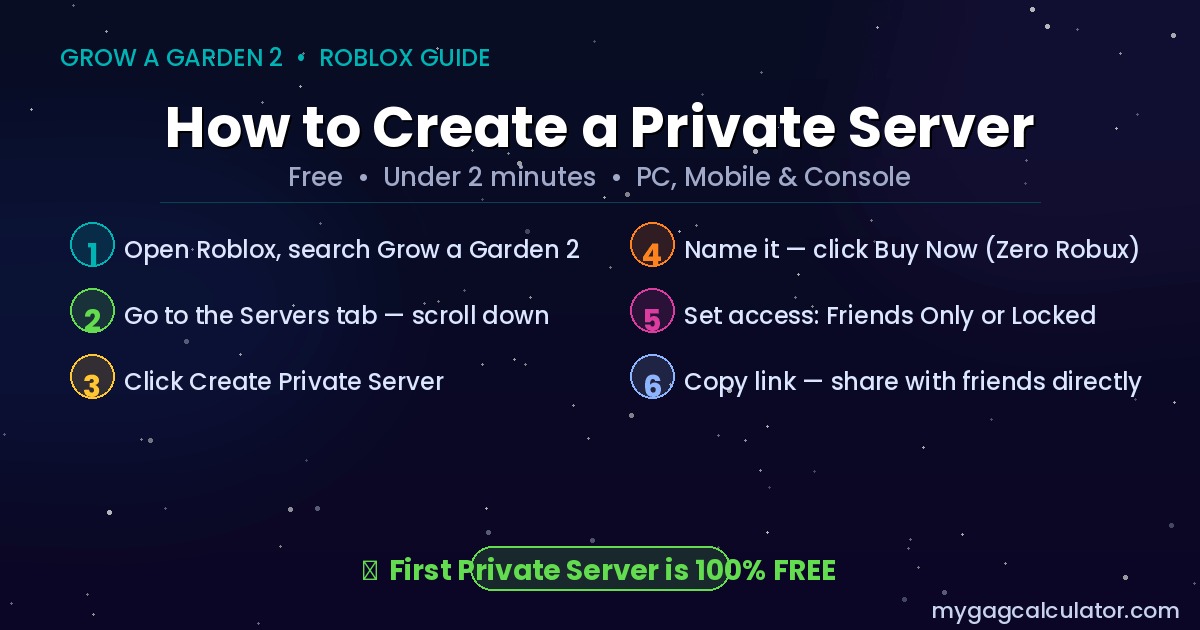
The creation process takes under two minutes and works the same way across PC, mobile, and console. The only requirement is being logged into a Roblox account — without login, the private server button is hidden and will not appear.
- Open Roblox in a browser, the desktop app, or the mobile app. Do not launch the game directly from a home screen shortcut, as that will take the player straight into a public server.
- Search for Grow a Garden 2 and open the official game page. Verify it is the official game to avoid clones and copycat titles.
- Scroll down the game page until the Servers tab appears. Click it to open the server browser.
- Click the Create Private Server button. It appears below the list of active public servers.
- A naming prompt will appear. Choose a name that is easy for friends to recognise — something distinguishable rather than a generic default. The name helps friends locate the server quickly in their list.
- Click Buy Now to confirm. No Robux will be charged. The server is created instantly.
- After creation, a settings panel opens. Configure access before inviting anyone — see the next section for what each setting does.
- Copy the server link at the bottom of the settings panel. Sharing this link directly with friends is the fastest way to get them into the server without them needing to search for it.
That is the full process. The server is live immediately and does not require any in-game setup to start working.
How to Configure Private Server Settings
After creation, the Configuration Page is accessible from the Servers tab on the game page at any time — not just at first setup. This is where the host controls who can enter the server.
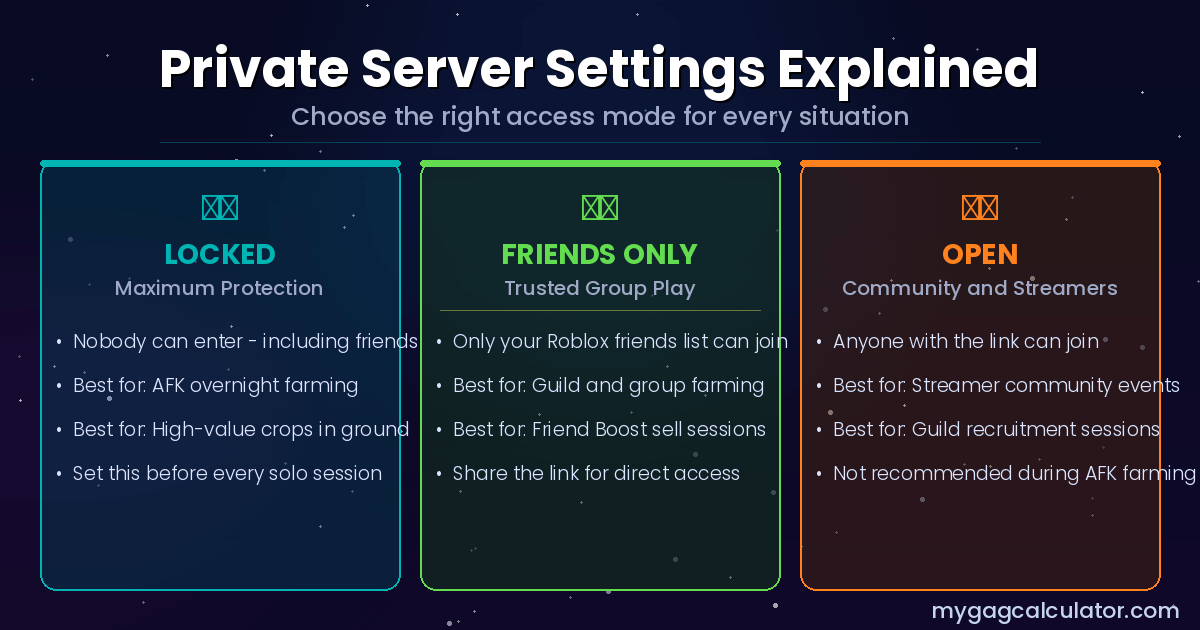
Friends Only vs Open vs Locked
Friends Only mode restricts access to Roblox accounts that are on the host’s friends list. This is the recommended setting for most use cases. It blocks random players while still allowing friends to join without needing a specific invite each time.
Open mode allows any Roblox player to join the server as long as they have the link or find the server in the public listing. This is the least secure setting and should only be used for intentional community sessions such as a streamer inviting followers or a guild leader running a coordinated farming event.
Locked mode prevents anyone from joining while the server is active — including friends. This setting is useful when going AFK overnight with high-value crops in the ground. Nobody can enter, which means the garden is as secure as a private server can be.
How to Share the Server Link
The server link appears at the bottom of the Configuration Page. Copying it and sending it directly to friends — via Discord, a group chat, or any messaging platform — is the fastest way to get people into the server. When someone clicks the link while logged into Roblox, the game launches and drops them into the correct server automatically.
Once a player has joined the server at least once, the server also appears in their own private server list in the Servers tab, so they can rejoin without needing the link again.
How to Remove a Player from a Private Server
If a player needs to be removed from an active session, the host can access the Configuration Page while the server is running and remove the player from there. The removed player is kicked from the session and will need a new invite or access to the link to return. This is also the fix if a player reports being stuck in the server due to a glitch — the host can remove and re-invite them rather than waiting for a reload.
What Happens When the Server Owner Leaves
The server itself persists as long as Roblox maintains the session — the host leaving the game does not shut the server down for other players in it. However, the host can close the server permanently from the Configuration Page at any time. Leaving the game by quitting normally only removes the host from the active session; it does not delete the private server itself.
How to Join Someone Else’s Private Server
There are three ways to join a private server in GAG2 that belongs to another player.
Via a Direct Link
The fastest method. If the server owner shares their server link, clicking it while logged into Roblox launches the game and loads the correct server directly. No searching required.
Via a Friend Invitation
If the server owner sends a Roblox friend invitation to join their server, a prompt appears in the Roblox interface. Accepting the prompt launches the game and drops the player into the server. After the first accepted invitation, the server will also appear in the player’s own Servers tab for future access.
Via the Servers Tab
On the Grow a Garden 2 page in Roblox, scrolling down in the Servers tab reveals two sections: the active public server list and a section for Other Servers and private servers the player has previously joined. Clicking Join on any listed server launches the game into that session.
It is worth noting that the Servers tab shows capacity. If a server is full, the Join button will not be available. A full server requires either waiting for someone to leave or contacting the host to free up a slot from their Configuration Page.
What You Gain and Lose on a Private Server
No honest guide about private servers skips the tradeoffs. Here is the full picture.
What a Private Server Gives
Theft protection. The night-phase stealing mechanic in GAG2 only applies to public servers. On a private server with no uninvited players, crops never leave the garden unless the host harvests them. This is the core reason most players set up a private server in the first place. The detailed breakdown of how night stealing works is covered in the GAG2 night stealing defense guide for players who want the full picture on that mechanic.
AFK safety. Leaving a high-value crop in the ground on a public server overnight is one of the most expensive mistakes in GAG2. On a private server set to Locked or Friends Only, the garden is untouched while the player is offline. Crops continue to grow, weather events continue to fire, and mutations continue to accumulate — all without active play required.
No competition for seed stock. On a public server, limited-stock seeds in the shop — Mushroom, Bamboo, Dragon Fruit, and similar higher-rarity items — can sell out in seconds when multiple players are present. On a private server, the full shop stock is available to whoever is in the session, which makes restocks significantly more accessible.
Focused gameplay. No random players. No distractions. For players learning the game’s mechanics or testing crop layouts, a private server is an effective practice environment where the stakes are lower and the pace is fully controlled.
What a Private Server Costs
The Friend Boost. This is the most significant tradeoff. GAG2 applies an earnings bonus when multiple players are in the same server. Each additional friend in the session adds approximately 10% to crop sell values, with a reported maximum of around 70% with a full server. On a fully solo private server, that bonus is zero. For players sitting on a large inventory of mutated high-value crops, selling alone means leaving a significant percentage of potential Sheckles on the table. See our dedicated guide on GAG2 friend boost.
Midas Event seed frequency. The Midas Event — which causes Gold Seeds to fall from the sky during the night cycle — has its spawn rate scaled with server player count. A solo private server has the lowest possible rate for this event. The same mechanic applies to the Rainbow Moon event for Rainbow Seeds. Players specifically farming these event seeds benefit from a fuller server.
Guild contribution limits. Guild point scoring requires active play, and while private servers do not block guild participation entirely, certain contribution mechanics may favour public sessions where more activity is occurring. The GAG2 guild guide covers the full guild system for players who need to optimise their contribution strategy.
AFK Farming on a Private Server: The Full Setup
AFK farming is the dominant use case for private servers in GAG2. The core mechanic that makes it viable is confirmed by multiple sources: crops in GAG2 continue to grow based on real time even after the player logs off. Planting before logging out and returning to fully grown crops is an intentional mechanic, not a glitch. See our complete gude on GAG2 AFK methods for idel forming.
That means the private server is not just a convenience for AFK play — it is the correct environment for it. Leaving crops in a public server overnight is an active risk. Leaving them in a private server set to Locked is as close to risk-free as the game allows.
The AFK Pre-Flight Checklist
The single most common mistake players make before going AFK is treating it as something that just happens when they stop playing. A proper AFK session requires a short setup sequence. Running through these steps before logging off makes a measurable difference in how much value the session produces.
- Fill every plot. Empty soil does not produce anything. If seeds are available, plant them before leaving. Prioritise slow-growing, higher-rarity crops — Mushroom, Bamboo, Dragon Fruit, Moon Bloom, and Mango — because their longer growth cycles align with AFK session lengths and their base values make the wait worthwhile.
- Stack sprinklers inside coverage radius. Sprinklers boost crop size and growth efficiency, and their effects apply during offline sessions.
- Apply a Watering Can to any crops showing early decay. Decayed crops lose value, and clearing decay before a session protects the harvest value of everything in the ground.
- Place defensive gear. A Gnome or appropriate crate gear at the garden perimeter adds a layer of protection in case something unexpected happens, even on a private server.
- Set the server to Friends Only or Locked depending on whether friends will be joining during the session.
- Check inventory space. A full inventory cannot accept harvested crops when the player returns. Clear space before logging off so harvesting is not blocked at the start of the next session.
- Copy the server link and share it with any friends who are joining during the session.
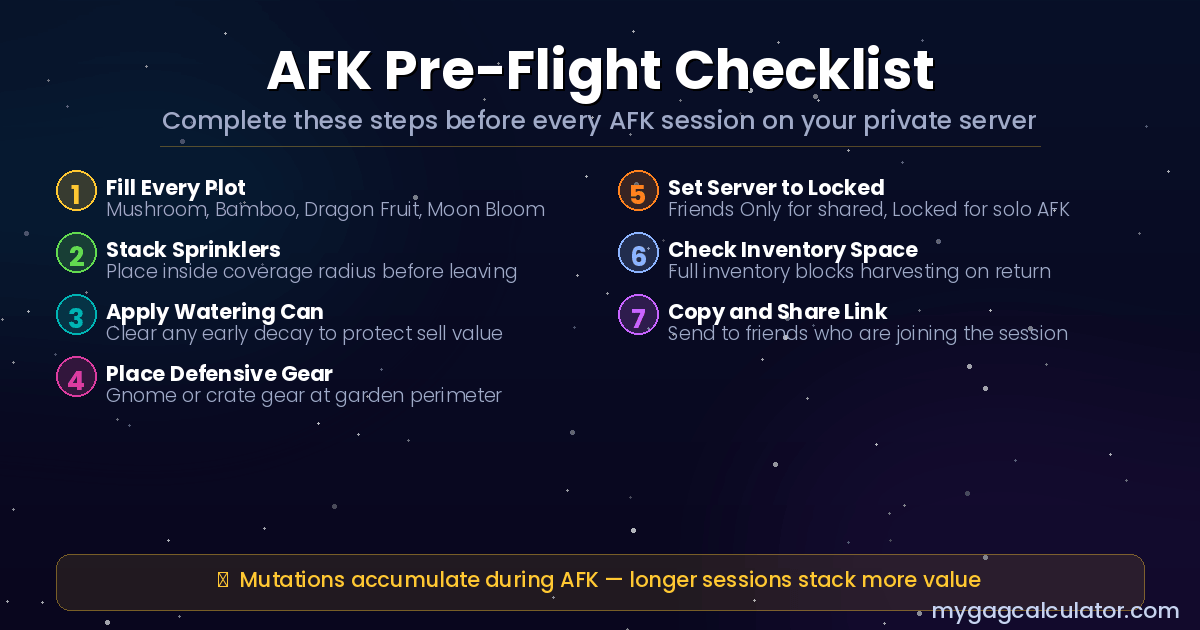
The sprinkler setup step in particular is worth pausing on. Stacking multiple sprinklers inside their coverage area — a setup covered in detail in the GAG2 sprinkler guide and GAG2 sprinkler calculator — has one of the highest return-on-investment ratios of any gear purchase in the game when combined with AFK sessions, because the size and luck bonuses compound across the full growth cycle without any active management.
Best Crops for AFK Private Server Farming
Not all crops are equally well-suited to AFK sessions. Fast-growing crops like Carrots and Strawberries are designed for active play — they cycle quickly, which means a player who is actively harvesting can reinvest frequently. For AFK sessions of two hours or longer, fast-growing crops waste their cycles while the player is offline.
The crops that reward AFK farming are the ones with longer growth cycles and higher base values. Mushroom and Bamboo restock with reasonable frequency in the seed shop and both produce solid returns. Dragon Fruit, Moon Bloom, and Mango sit at higher rarity tiers and are worth leaving in the ground for extended sessions. For players using the
For players using the Profit Calculator to plan session value, the key input is growth time versus sell value. Crops that take two or more hours to reach full size are the correct target for overnight AFK runs. Crops that mature in under 30 minutes are better harvested actively.
Weather Events, Mutations, and AFK Sessions
This is the part of AFK farming most players do not fully understand. Weather events in GAG2 fire on a natural timer regardless of whether any player is actively watching. Rain, Thunderstorm, Meteor Shower, Blood Moon, and all other standard weather events accumulate mutation stacks on crops in the ground during AFK sessions.
The practical implication is significant. A crop left in the ground for an eight-hour AFK session on a private server has the potential to accumulate multiple mutation stacks across several weather cycles — entirely passively. When the player returns, they may be harvesting a crop with stacked mutations worth multiples of its base value, without having done anything beyond planting it and logging off.
The full list of weather events, their mutation effects, and how stacking works is covered in the GAG2 weather events guide. For players who want to plan which mutations are most likely to fire during a given session window, the Weather Tracker tool provides real-time event monitoring.
One important note for mutation farming: multi-harvest crops (crops that can be harvested repeatedly without replanting, such as Strawberries and Apples) retain their mutations between harvests. This makes them excellent AFK targets for the mid-game — plant once, let mutations accumulate across multiple weather cycles, and harvest repeatedly with the mutation bonus applied each time.
For working out the exact sell value of a mutated crop before deciding whether to harvest or hold, the Mutation Calculator is the fastest tool for the calculation.
Private Server vs Public Server: The Full Decision Framework
The most useful thing any private server guide can do is tell players when not to use one. Private and public servers are not in competition — they serve different purposes, and switching between them based on what the session goal is produces significantly better outcomes than defaulting to one or the other permanently.
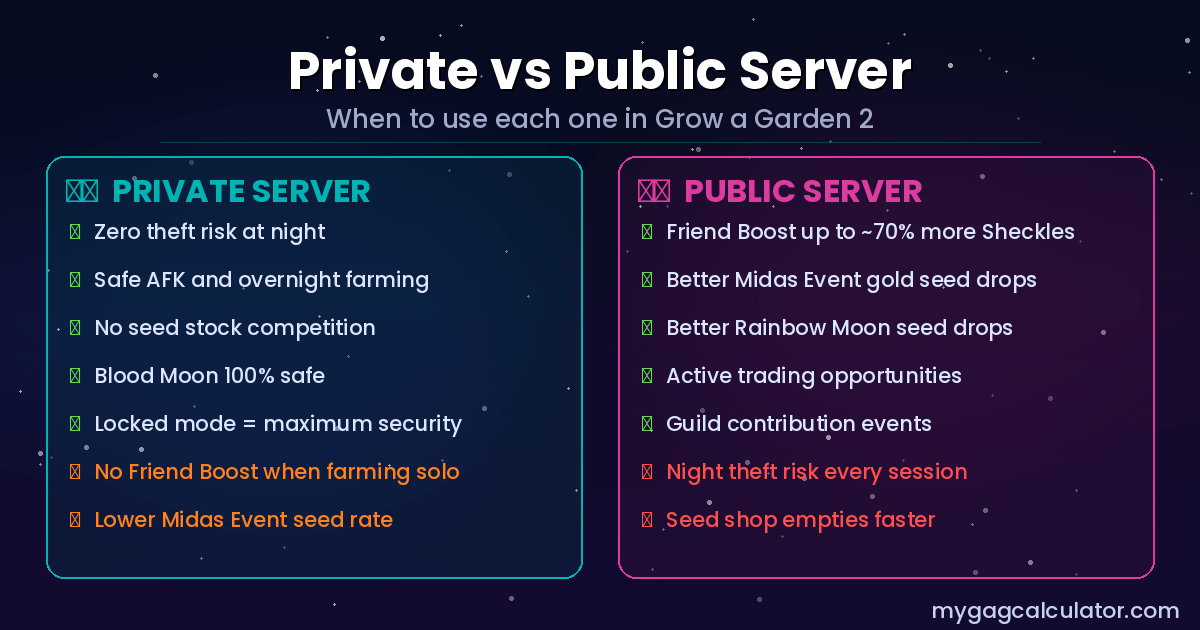
Use a Private Server When
- Going AFK for any session longer than 30 minutes, especially overnight.
- High-value mutated crops are in the ground and cannot be actively defended.
- It is Blood Moon and the player cannot actively protect the garden during the night phase.
- Learning the game’s mechanics without the pressure of theft or resource competition.
- Running a coordinated friend session where all participants are trusted and the server is set to Friends Only.
- A guild event requires sustained crop growth with no risk of interruption.
Use a Public Server When
- Actively selling a large inventory and friends are available to join for the Friend Boost — up to a reported 70% earnings increase with a full server, which on a high-value mutated crop inventory can mean a substantial difference in Sheckles received.
- Hunting Gold Seeds during the Midas Event, which has a player-count-scaled spawn rate.
- Hunting Rainbow Seeds during a Rainbow Moon event, which follows the same scaling mechanic.
- Active trading is the session goal.
- Guild contribution scoring favours active presence in a live server.
The Farm Private, Sell Public Strategy
The most efficient approach for advanced players combines both server types. Crops are grown and mutated on a private server where they are safe. When the inventory is ready to sell, the player invites friends to a private server (or joins a public server where friends are present) to activate the Friend Boost before selling. The protection phase and the monetisation phase use different server types for the same session’s crops.
This strategy is especially powerful when paired with the Daily Deal mechanic — a single-use daily selling bonus that should always be saved for the highest-value inventory sell. Combining Daily Deal with a full friend-boosted server and a stack of mutated crops is the highest single-session Sheckles output available in GAG2. The how to make Sheckles fast guide covers the full Daily Deal timing strategy for players who want to maximise each sell.
The Blood Moon Private vs Public Debate
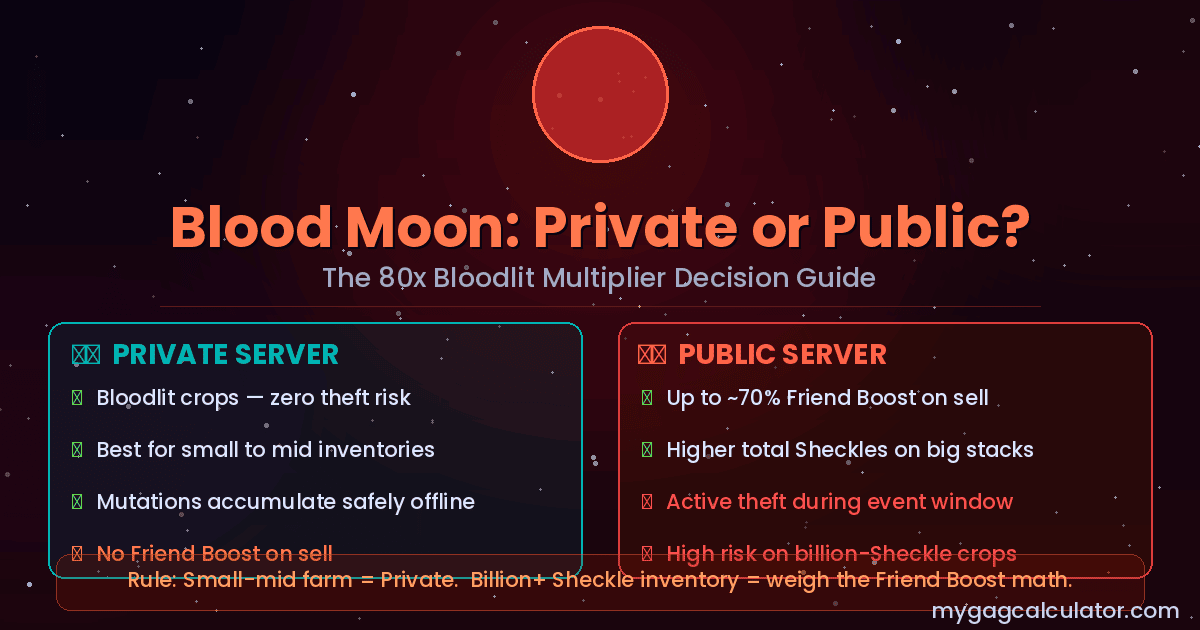
Blood Moon is the highest-value night event in GAG2. Crops in the ground during Blood Moon accumulate the Bloodlit mutation, which carries an 80x multiplier — making it one of the most powerful mutation outcomes in the game. The problem is timing: Blood Moon fires during the night phase, which is also the active theft window. That creates a genuine strategic conflict. Use our event tracker to track events in GAG2.
On a public server, Blood Moon crops are growing with the Bloodlit mutation while thieves are actively looking for targets. The crops with the highest potential sell value are being grown at exactly the same time the server is most dangerous. Players who sell with a full friend-boosted server after Blood Moon earn more per crop — but they also risk losing crops before the harvest.
On a private server, Blood Moon fires safely. No thieves. The Bloodlit mutation accumulates without any theft risk. The tradeoff is no Friend Boost on the sell unless the player switches servers before cashing out.
The correct answer depends on one variable: how much is the inventory worth? For a small-to-mid-game Blood Moon crop stack, the Friend Boost percentage gain on a public server is likely not worth the theft risk on crops that have not yet been harvested. For a late-game stack of high-value crops where 70% additional sell value translates to hundreds of millions of Sheckles, the math may shift toward accepting the risk on a busy public server with active defence.
The Bloodlit mutation guide covers the full mechanic, stacking rules, and value calculation for Blood Moon crops.
The Midas Event and Rainbow Moon on Private Servers
Both the Midas Event and the Rainbow Moon event are player-count-scaled in GAG2. Fuller servers have a higher chance of triggering these events, which is confirmed by testing rather than just player speculation.
A solo private server has the lowest possible trigger rate for both events. That does not mean they will never fire — it means they fire less frequently than on a server with more players present.
Players who are specifically farming Gold Seeds or Rainbow Seeds have two options. The first is to stay on a public server with a reasonable population during the periods when these events are most likely to fire. The second is to fill a private server with as many trusted friends as possible to increase the player count without introducing theft risk — a partial solution that sacrifices some event rate for security.
A third approach that some players use is to invite secondary accounts into the private server to artificially increase the player count without adding real people. This raises the event trigger rate while keeping the garden secure. The effectiveness of this depends on how many secondary accounts the player can manage simultaneously.
The GAG2 seeds guide covers Gold Seeds and Rainbow Seeds in full detail, including base values, event timing, and what to do with them after they are collected.
No-Steal Communities and Finding Other Players’ Servers
Some players prefer to play on public servers but want to find communities that have informally agreed not to steal from each other. These no-steal communities exist primarily through Discord servers and game community hubs, where server links are shared with an expectation of cooperative play.
The honest caveat is that these communities offer no enforcement mechanism. A no-steal agreement on a public server relies entirely on the goodwill of everyone who joins. Rule breakers are a real risk, and there is no game-level protection against theft on a public server regardless of any social agreement. A private server set to Friends Only is the only technically enforced no-steal environment in GAG2.
For players who want to find community private servers — whether no-steal farming groups, guild coordination sessions, or streamer-hosted events — the best source is the official game community on Roblox and community Discord servers where links are shared actively. Joining a guild with an active server-sharing culture is one of the most reliable ways to access a trusted private server without hosting one personally.
Common Private Server Mistakes
Most private server errors are not about the server setup itself — they are about how players use the server within their broader farming strategy.
- AFK farming on a public server at night. This is the single most common and most expensive mistake in GAG2. The night phase is the theft window. Leaving any valuable crops in the ground on a public server while offline is donating them to whoever is active on that server.
- Not setting Friends Only or Locked before going AFK. A private server with Open access is only marginally safer than a public server if the server link has been shared broadly. Lock the server before stepping away.
- Leaving empty soil before an AFK session. Empty plots produce nothing. A fully planted garden at the start of an AFK session maximises what is ready to harvest on return.
- Forgetting sprinklers before AFK. Sprinklers require physical placement and their effects apply passively. A garden left without sprinklers during an eight-hour session misses the entire size and luck window those tools would have provided.
- Using fast-growing crops for long AFK sessions. Fast crops mature and sit idle for most of the session. They are not wrong crops — they are wrong-timing crops.
- Leaving inventory full before an AFK session. A full inventory blocks harvesting on return and forces a selling detour before anything else can happen.
- Selling mutated high-value crops alone on a private server. The no-theft security of a private server makes it excellent for growing. Selling should, wherever possible, involve the Friend Boost. The farm-private-sell-with-friends strategy exists precisely because the two phases have different optimal environments.
- Not knowing the first server is free. A significant number of players assume private servers cost Robux and never create one. The first server is entirely free.
Frequently Asked Questions
Is a private server in Grow a Garden 2 free?
Yes. The first private server is completely free. The Buy Now button during creation costs zero Robux. Additional servers beyond the first require Roblox Premium at $4.99 USD per month.
How do you make a private server in Grow a Garden 2?
Open the game page in Roblox, go to the Servers tab, click Create Private Server, choose a name, and confirm. The server is created instantly at no cost.
How many players can join a GAG2 private server?
Server player capacity in GAG2 is reported at up to 8 players per session, with each additional friend adding approximately 10% to crop sell values via the Friend Boost. This figure comes from player testing rather than an official developer data sheet, so it is worth confirming in-game if the exact cap matters for a specific strategy.
Can someone steal crops on a private server?
Only if the host invites them and they choose to steal. On a private server set to Friends Only or Locked, no uninvited player can enter. Theft is only possible from players who have been given access to the server.
Do crops still grow offline on a private server?
Yes. Crops in GAG2 grow based on real time, not session time. Planting before logging off and returning to fully grown crops is a confirmed, intentional mechanic.
Do weather events happen on private servers?
Yes. All standard weather events — Rain, Thunderstorm, Meteor Shower, Blood Moon, and others — fire on private servers just as they do on public servers. Mutations accumulate on crops in the ground during these events even if the player is offline.
Does the Friend Boost work on a private server?
Yes, but only if friends are actually present in the server at the time of selling. An empty private server has no Friend Boost. A private server with seven invited friends active has the same boost potential as a public server with the same player count.
What is the garden lock in GAG2?
Staying inside a garden during the night phase activates a lock that prevents other players from entering and stealing crops. On a private server with no uninvited players, the garden is effectively always locked against theft — the mechanic is an additional layer on public servers.
Should beginners use private or public servers?
Private servers are the lower-stress starting point. No theft risk, no competition for seeds, and full control over the farming pace. Once the core mechanics are understood, switching between server types based on the session goal produces better results.
Can I get mutations on a private server?
Yes. Mutations are triggered by weather events, which fire on private servers at the same frequency as public servers (with the exception of Midas Event and Rainbow Moon, which scale with player count). All other mutations accumulate normally.
Are no-steal servers in GAG2 reliable?
No-steal communities on public servers rely entirely on social agreements with no enforcement mechanism. A private server with access control is the only technically enforced no-steal environment in the game.
Can I do guild activities on a private server?
Guild participation is possible on private servers. The main consideration is that certain guild contribution mechanics may favour active presence in a live session, so coordinating guild farming with other members on a shared private server can be more efficient than farming solo.
What happens if I AFK on a public server at night?
Crops in a public server garden during the night phase can be stolen by any player who enters the garden. AFK farming on a public server at night is the highest-risk farming scenario in GAG2 and the primary reason private servers exist.