Published by: Saif (Jun 2026) | Platform: Roblox | Game: Grow a Garden 2
| Players join a guild in Grow a Garden 2 by accepting an invite through the mailbox outside their garden, or by creating their own guild through Gilbert at the Guild Stand for 99 Robux. Joining an existing guild is always free. Once inside, guild points come from each member’s heaviest single harvest (1 point per gram) or, during Cash Drop weeks, from the biggest single inventory sale. The guild with the most combined points each week climbs the leaderboard and earns rewards ranging from Common Eggs up to the exclusive Ice Serpent and Black Dragon pets. |
At a Glance
| Question | Answer |
| Is joining a guild free? | Yes, joining is always free. Only creating a guild costs Robux. |
| How much to create one? | 99 Robux through Gilbert at the Guild Stand. |
| Where do invites appear? | In the Mailbox outside the garden, under the Mail tab. No screen popup confirms it. |
| Starting member cap? | 20 members, expandable in 5-member tiers up to 50. |
| How are points scored? | 1 point per gram of the heaviest single crop harvested (Biggest Plant weeks) or biggest single sale value (Cash Drop weeks). |
| Best rewards available? | Ice Serpent and Black Dragon, Super-rarity pets unavailable anywhere else in the game. |
| How often does it reset? | Every 7 days, with rewards delivered to the Mailbox. |
Guilds are one of the biggest additions Grow a Garden 2 brought to the Roblox farming sim, and they did not exist at all in the original game. Instead of farming alone, players can team up, pool their best harvests, and chase weekly leaderboard rewards that include pets no Sheckle purchase or egg hatch can ever produce. The catch is that the system is genuinely confusing the first time around.
There is no popup when an invite lands, no clear signpost for where to find one if a player has no friends already in a guild, and the scoring rules quietly change from week to week depending on which challenge is currently running. This Grow a Garden 2 Guild Guide walks through every stage of the guild experience in the order a new player actually runs into it: finding an invite, accepting it, building a guild from scratch, understanding how points are actually calculated, and squeezing the most value out of the weekly reward tiers. See a dedicated guide for every beginner in GAG2, what to do in next 30 mins?
What Are Guilds in Grow a Garden 2 and Why They Matter
Guilds are persistent player groups managed through an NPC named Gilbert, who stands at the Guild Stand in the center of the map alongside the Sell Stand and the Props Shop. A guild functions as a shared scoreboard: every member’s best weekly contribution adds to one combined total, and that total is ranked against every other guild on the server. The whole system did not exist in the first Grow a Garden, where players only ever competed individually. Adding a group-based leaderboard gave the sequel a genuine social and competitive layer that solo play never had. Also see our guide on biggest carrot guild event guide.
The biggest reason to bother with a guild at all comes down to two pets that simply cannot be obtained any other way. The Ice Serpent is a Super-rarity defender that flies above the garden and breathes frost on intruders, freezing them in place long enough for the owner to get back and deal with the theft. The Black Dragon is the other guild-exclusive Super pet, and both come only from finishing inside the top brackets of a weekly guild competition, never from a Sheckle purchase or a standard egg hatch. For players who care about night defense or simply want the rarest cosmetic flex in the game, a guild is the only door in.
No Guild Invite Yet? Here Is Exactly Where to Find One
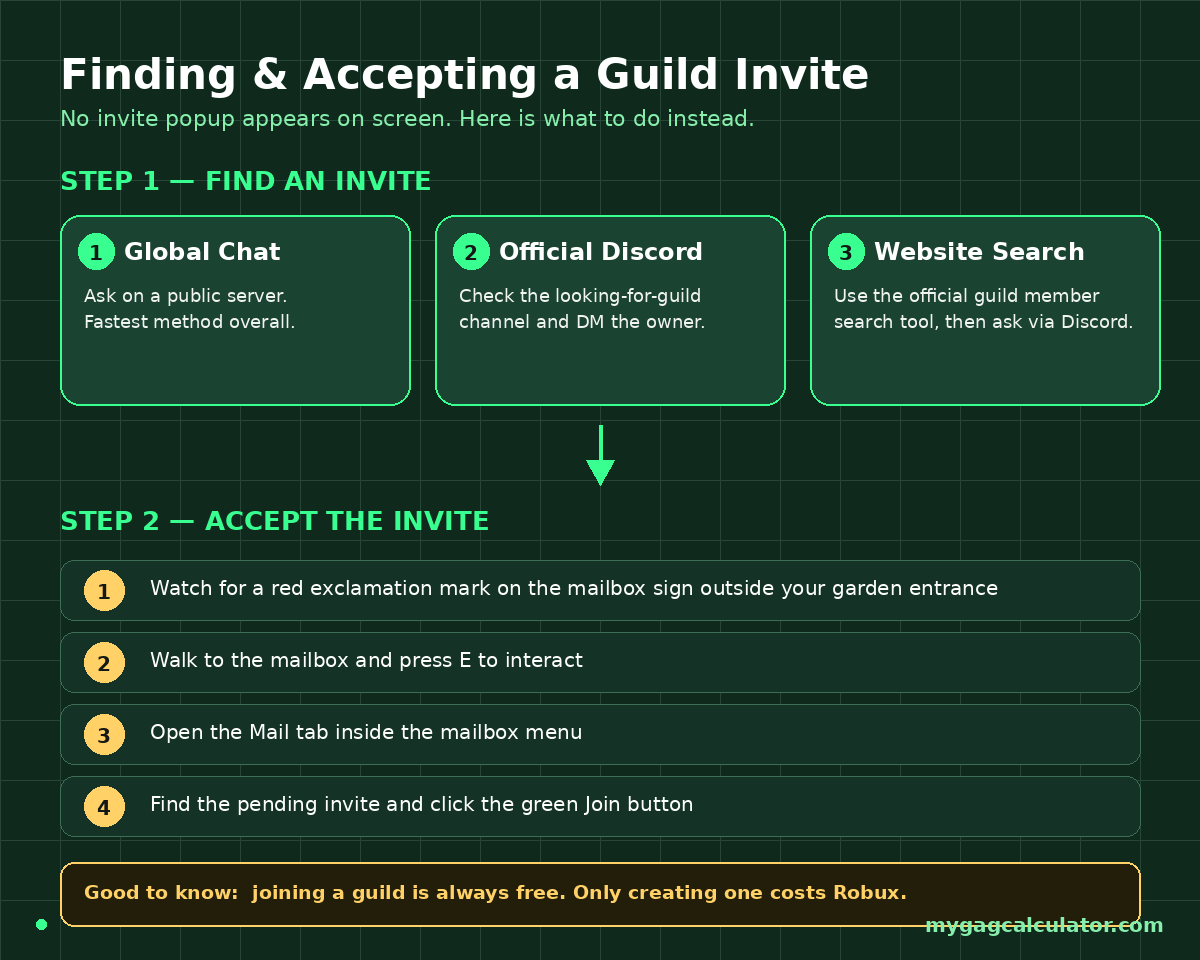
Most guides covering this topic assume a player already has an invite sitting in their mailbox and just needs to know which button to press. That skips over the actual hard part for a brand-new player: nobody has invited them to anything yet, and there is no in-game directory that lists open guilds. The fastest paths to an actual invite are below, roughly in order of speed.
Ask in Global Chat on a Public Server
This is the single fastest method. Public servers (not private servers) carry a global chat where existing guild owners and elders are constantly looking to fill empty slots. Typing a short, polite request asking for a guild invite in global chat often gets a response within minutes, especially right after a weekly reset when guilds are actively rebuilding their rosters. Some guild owners will check a prospective member’s heaviest crop before accepting, since a heavier contributor helps the whole guild’s score.
Use the Official Grow a Garden Discord Server
The official Discord runs a dedicated looking-for-guild channel where guild owners and moderators post open recruitment listings. The usual flow is to open that channel, scan the active posts, and direct message the owner or moderator who posted the one that fits. Most recruitment posts list requirements upfront, things like a minimum Sheckle balance, an active playstyle, or a ready-to-harvest crop, so it helps to check those before reaching out rather than after getting turned down. Once a request is approved, the owner may ask the new recruit to join their private server briefly so the invite can be sent directly.
Search for a Guild Member on the Official Website
The official Grow a Garden 2 website includes a search tool for finding individual guild members, which works well as a backdoor recruitment method. After confirming the game account is logged in, a player can use the Discord button next to another player’s name to reach out directly and ask about an open guild slot.
Play Normally on Public Servers
Even without actively asking, invites do occasionally arrive simply from playing on public servers over time, particularly for players with a visibly heavy harvest sitting in their garden. Guild leaders scouting for strong contributors sometimes send invites unprompted to players who look like they would boost the leaderboard score.
How to Accept a Guild Invite in Grow a Garden 2
This is the actual moment that trips up the most new players, and it is the literal answer to the search query that brought most readers here. Once someone sends an invite, nothing dramatic happens on screen. There is no celebratory popup the way there is for gifts, which leads a lot of players to assume the invite never went through and give up on a guild they were already accepted into.
Why No Popup Appeared (That Is Normal)
A guild invite does not trigger a screen notification. Instead, watch for a small red exclamation mark appearing on the mailbox sign just outside the garden entrance. That mark is the only visual cue that something new is waiting, and it is easy to miss if a player is not specifically looking for it.
Step-by-Step: Accepting the Invite
- Walk to the mailbox located beside the garden’s signboard, just outside the garden entrance.
- Press E to interact with the mailbox.
- Open the Mail tab inside the mailbox interface.
- Find the pending guild invitation and click the green Join button.
- The player is now officially a guild member and can immediately begin contributing to the weekly score.
If a red exclamation mark is showing but no invite appears in the Mail tab, the most common fix is to fully close and reopen the mailbox interface, or to ask the guild owner to resend the invite, since invites occasionally fail to register if the recipient was mid-transition between servers.
Joining Costs Nothing
It is worth stating plainly since it confuses new players coming from games where social features cost currency: accepting a guild invite is completely free. The only Robux cost anywhere in the guild system is the one-time fee to create a brand-new guild from scratch, covered in the next section.
How to Create a Guild in Grow a Garden 2
Creating a guild makes sense for players who already have a regular group of friends and want full control over branding, roster, and management rather than joining someone else’s existing setup. It is not free, so it is worth committing to running the guild long-term before spending the Robux.
Creation Cost and Setup Steps
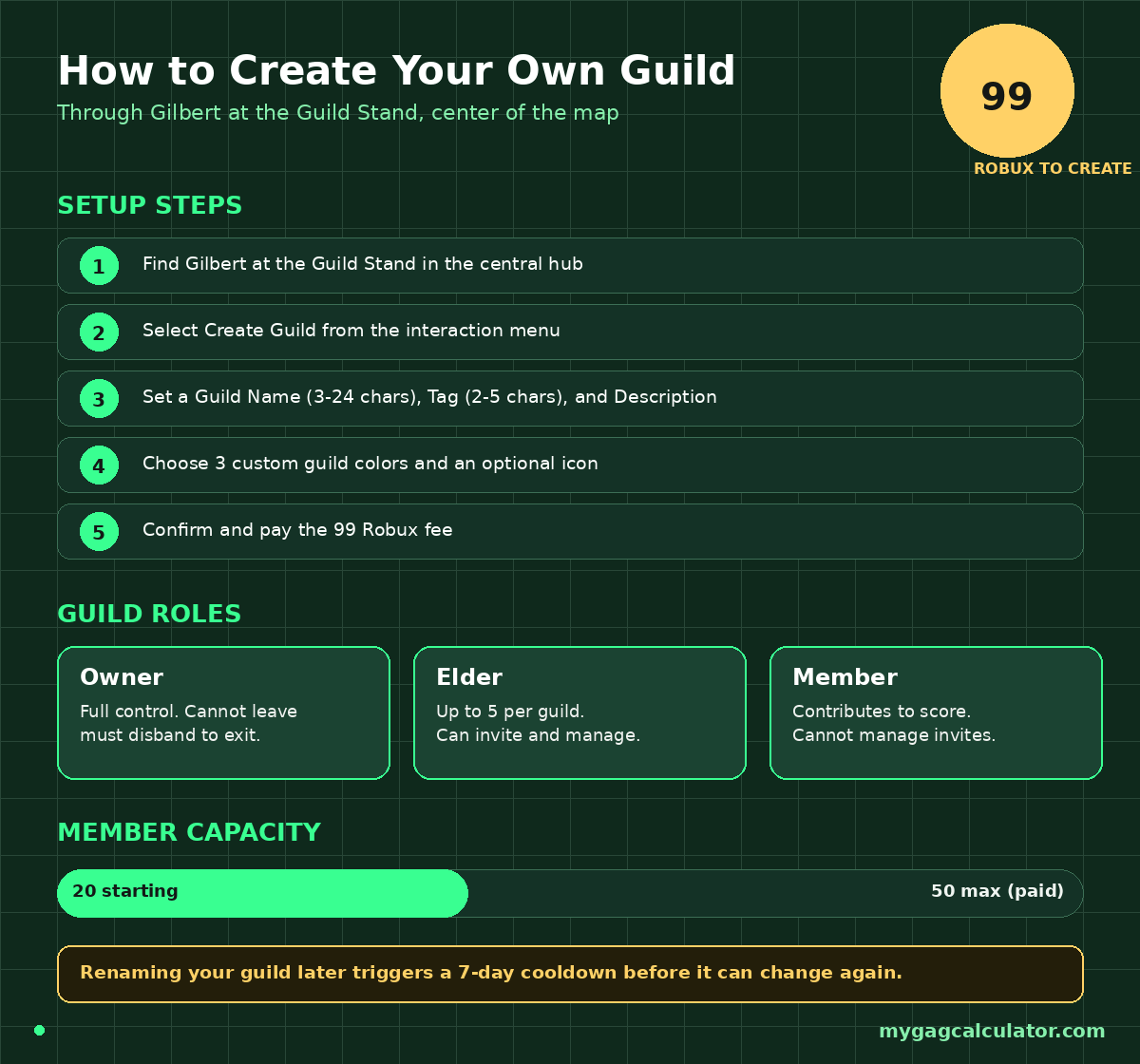
- Head to the Guild Stand in the central hub and find Gilbert, the NPC who manages everything guild-related.
- Interact with the stand and select the Create Guild option.
- Enter a Guild Name (3 to 24 characters), a Guild Tag (2 to 5 characters), and a short Description (1 to 200 characters).
- Select three custom guild colors and, optionally, a custom guild icon using a valid game image asset ID.
- Confirm and pay the 99 Robux creation fee.
One detail almost no guide mentions: changing the guild name after creation triggers a 7-day cooldown before it can be changed again. That makes the initial naming decision more important than it might seem, since a typo or a name that turns out to clash with another active guild cannot be quickly fixed.
Guild Roles and Permissions
Every guild runs on three roles. The Owner is the founding player and holds full control, including the only ability to disband the guild entirely. Elders, of which a guild can have up to five, can invite new players and help manage the roster, but cannot remove the Owner or delete the guild. Regular Members can contribute to the weekly score and view guild details but cannot manage invitations. One genuinely useful piece of advice circulating among active guild owners: only hand the Elder role to players who are actually trusted, since Elders can invite and, depending on settings, remove members on the Owner’s behalf.
A Guild Owner Cannot Simply Leave
This is a real gap in most existing guides. A regular Member or an Elder can leave a guild at any time through the View Guild menu. The Owner cannot. To step away from a guild they founded, an Owner has to disband it entirely, which permanently deletes the guild for every member. Anyone planning to hand off leadership eventually should think about that limitation before creating a guild solo.
Inviting Members After Creation
Once a guild exists, pulling in members works two ways. The Owner or an Elder can open the guild’s Invite tab and select players currently in the same server lobby, or set up a private server specifically to invite friends who are not online at the same time. Invited players do not automatically join the moment an invite is sent; they still need to accept it through their own mailbox, the same process covered above.
Expanding Member Capacity
Every guild starts with room for 20 members and can be expanded in five-member tiers up to a hard cap of 50. Slot expansion costs Robux, and the price climbs with each tier purchased, so larger guilds pay progressively more for additional capacity.
| Guild Size | Notes |
| 20 members (starting cap) | Default capacity at creation, no extra cost. |
| 25 to 50 members | Purchased one 5-member tier at a time. Pricing rises with current guild size, so expanding early is cheaper than expanding late. |
How Guild Points Actually Work (And Why the Method Changes)
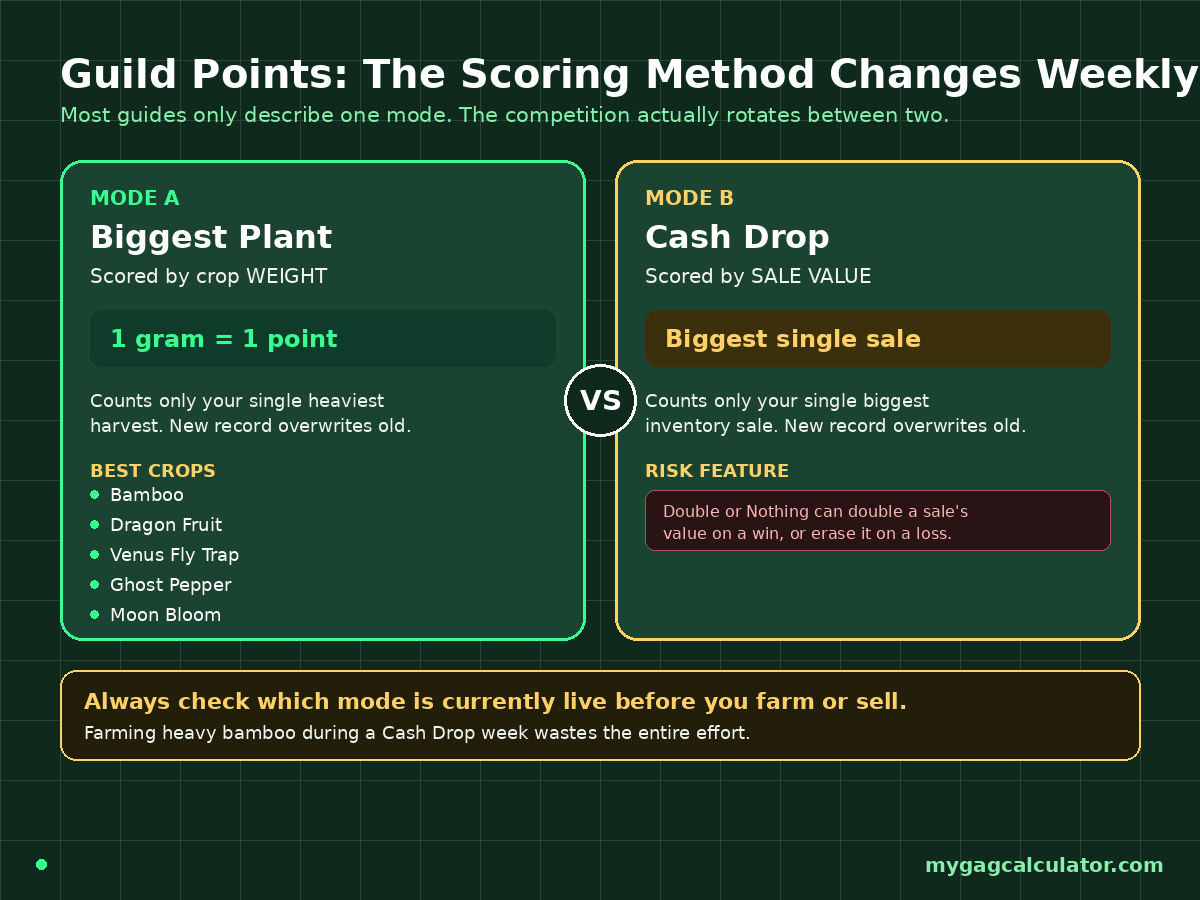
This is the section where most existing guides fall apart, because they each describe whichever single challenge type happened to be live the week they were written, without mentioning that the scoring method itself rotates. Grow a Garden 2’s guild competition has run at least two genuinely different formulas since launch, and treating either one as permanent is a mistake.
Biggest Plant Mode: Weight-Based Scoring
Under this format, points come from the weight of each member’s single heaviest harvested crop, awarded at a rate of 1 point per gram. Selling more crops or harvesting in volume does nothing for the score; only the single heaviest plant any one member ever turns in counts, and a new personal best simply overwrites the old one. The guild’s total score is the sum of every member’s personal best, which means a guild’s score grows fastest by recruiting more active, heavy-hitting members rather than by squeezing more harvests out of the existing roster.
Crops that naturally grow large make the biggest difference here. Bamboo, Dragon Fruit, Venus Fly Trap, Ghost Pepper, and Moon Bloom are repeatedly cited by experienced players as reliable, naturally heavy options worth prioritizing during a Biggest Plant week, since their baseline mass already gives a head start before any mutation multiplier is applied. See guide on all mutations in GAG2.
- Run the Grow a Garden 2 Mutation Calculator before committing to a crop, since stacking the right mutation on top of a naturally heavy plant can be the difference between a mid-tier finish and a top-10 finish.
- The Grow a Garden 2 Weight Calculator is the fastest way to check whether a current harvest is actually heavier than a previous personal best before turning it in, since only a new record adds fresh points.
Cash Drop Mode: Sale-Value Scoring
In a separate challenge format, the guild score is instead based on the value of each member’s single biggest inventory sale, not crop weight at all. The same overwrite rule applies: only beating a previous personal sale record adds new points, so dumping small sales constantly is wasted effort. Some sources also note a Double or Nothing option appears in the sell flow during these weeks, which can double a sale’s value on a win but wipe it out entirely on a loss. Treating that feature as a casual extra rather than a core strategy is the safer approach, since a string of losses can erase a guild’s hard-earned progress in seconds.
- Before risking a big sale on Double or Nothing, running the numbers through the Grow a Garden Profit Calculator first shows exactly how much is actually on the line.
Why This Matters: Always Check the Current Challenge Type First
Because the formula behind the score is not fixed, the single most useful habit for a guild member is checking which challenge is currently live before deciding what to farm or sell that week. A guild grinding heavy bamboo during a Cash Drop week is wasting effort that could have gone toward a high-value sale instead, and the reverse is just as true. Checking the live event status, including any active weather multiplier, through a resource like the site’s own Grow a Garden 2 event tracker before committing time to a specific strategy avoids that mismatch entirely.
- Active weather and night events change crop value dramatically. The Grow a Garden Weather Tracker shows exactly which multiplier window is live right now, which matters just as much during a guild week as it does during normal solo farming.
Competition Cadence
Regardless of which scoring format is active, the cycle itself resets on a consistent 7-day clock. Standings are visible on a server-wide leaderboard throughout the week, and once the cycle ends, rewards are calculated by final placement and delivered directly to each member’s mailbox.
Grow a Garden 2 Guild Rewards by Rank
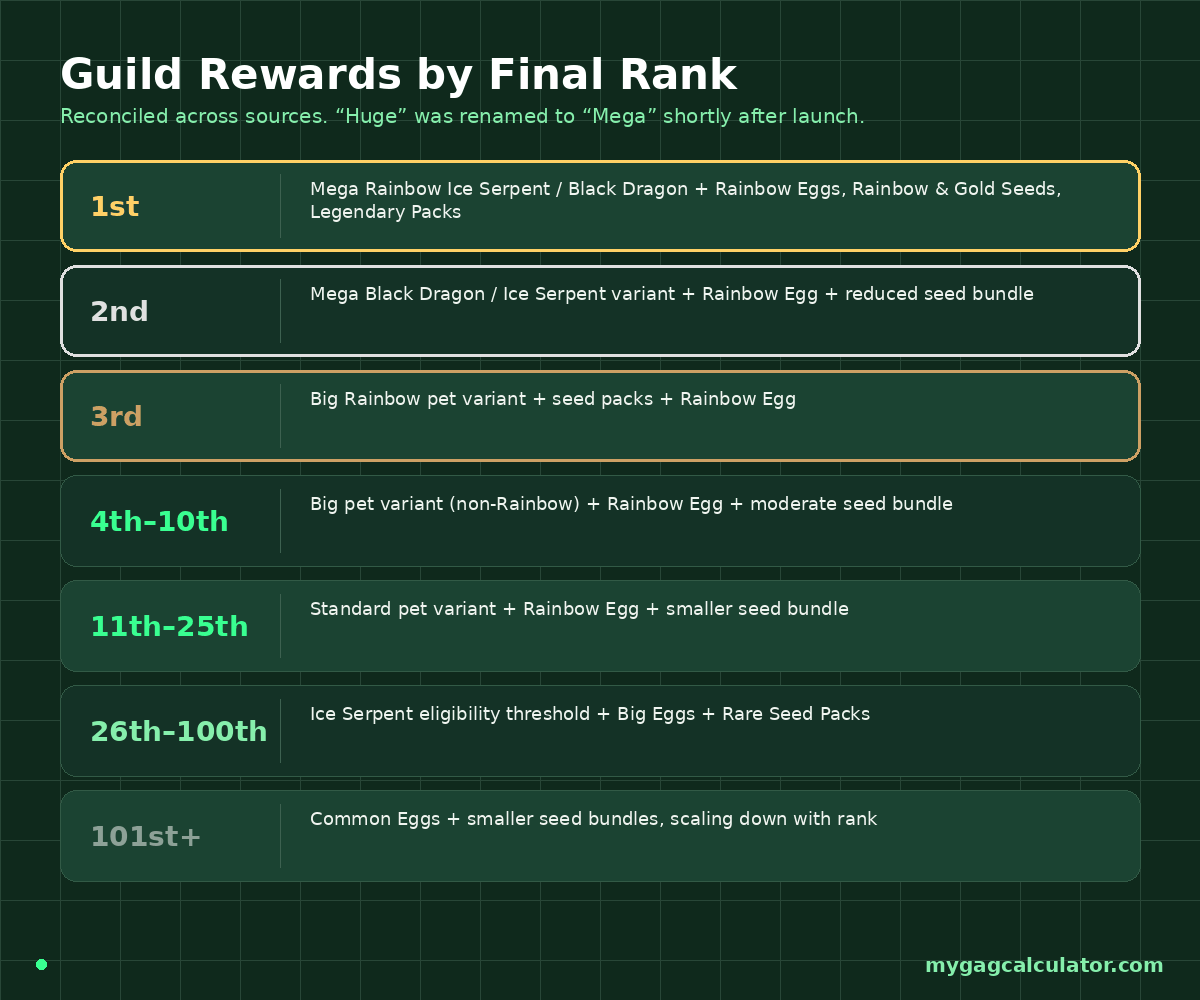
Reward data has varied slightly across sources since launch, partly because the in-game naming for top-tier rewards changed mid-cycle. The Wiki’s original “Huge” pet rarity label was renamed to “Mega” shortly after release, so a “Huge Rainbow Ice Serpent” reported in early guides and a “Mega Rainbow Ice Serpent” reported in newer ones refer to the exact same top-tier reward, not two different prizes. The table below reflects the most consistent, recently verified placement structure.
| Guild Rank | Typical Reward |
| 1st place | Mega Rainbow Ice Serpent or Black Dragon, plus Rainbow Eggs, Rainbow Seeds, Gold Seeds, and Legendary Seed Packs. |
| 2nd place | Mega Black Dragon or Ice Serpent variant, a Rainbow Egg, and a slightly reduced seed bundle. |
| 3rd place | Big Rainbow variant of the top pet, plus seed packs and a Rainbow Egg. |
| 4th to 10th | Big pet variant (non-Rainbow), Rainbow Egg, and a moderate seed bundle. |
| 11th to 25th | Standard pet variant, Rainbow Egg, and a smaller seed bundle. |
| 26th to 100th | Standard Ice Serpent eligibility threshold, plus Big Eggs and Rare Seed Packs. |
| 101st and below | Common Eggs and smaller seed pack bundles, scaling down with rank. |
The two headline prizes deserve a closer look since they cannot be obtained through any other method in the game. The Ice Serpent flies above the garden and breathes frost on any intruder caught trying to steal crops, freezing them in place and dealing damage with every application, which makes it the strongest dedicated anti-theft pet currently available.
The Black Dragon fills a similarly exclusive role as the other Super-rarity guild-only reward. Only guilds finishing inside the top 100 unlock either pet at all, and the specific variant awarded (standard, Big, or Mega, with or without the Rainbow trait) scales directly with final placement, so a guild that climbs from rank 50 to rank 8 walks away with a meaningfully stronger version of the same pet.
- Anyone deciding whether a guild-earned pet is worth chasing, or sizing up a pet offered in a guild trade, can check current valuations on the Grow a Garden 2 Trade Calculator before agreeing to anything.
- Once a guild-exclusive pet is in hand, the Grow a Garden 2 Pet Calculator helps figure out exactly how much its ability is worth across a full farming session.
How to Maximize Guild Points Without Wasting Effort
Coordinate Harvest Timing Around High-Multiplier Events
Since only a personal best counts, the smartest move is holding off on a final harvest or final sale until a high-multiplier weather window is active, then cashing in during that window rather than at a random point in the week. A heavy crop harvested or sold during a major multiplier event can be worth dramatically more than the same crop turned in during ordinary conditions, so checking active multipliers before committing a personal best is rarely wasted time.
Bigger Rosters Usually Win, But Only With Active Members
Because guild score is the sum of every member’s individual best, a guild with more active contributors will almost always outscore a smaller guild, even if the smaller guild’s top player is individually stronger. This is also why filling every available slot before a competition heats up matters: an empty slot is a guaranteed zero, while even a modest contributor adds something. The flip side is that inactive members who never harvest or sell anything provide no benefit at all, so periodically reviewing the roster and freeing up slots for active replacements tends to help guilds that are stuck mid-leaderboard.
Is Joining a Guild Worth It for Solo Players?
Yes, and there is essentially no downside, since joining costs nothing. A solo-focused player loses nothing by accepting an invite and contributing whenever convenient, while still picking up a share of whatever reward tier the guild finishes in. The only real decision is whether to also spend Robux creating a guild, which only makes financial sense for someone planning to run it actively over the long term rather than as a one-off.
- Planning out which crops to grow for an upcoming guild week pairs well with the Grow a Garden 2 Crop Planner, which lays out growth timing so a heavy harvest is ready right as the weekly reset approaches.
Common Guild Mistakes to Avoid
- Joining a guild that is already inactive or barely populated without checking recent leaderboard movement first.
- Spreading sales across many small transactions instead of saving everything for one record-breaking sale during a Cash Drop week.
- Using Double or Nothing repeatedly without a stopping point, since the odds compound against the player with every extra attempt.
- Handing out the Elder role to someone untested, since Elders can invite and manage the roster on the Owner’s behalf.
- Creating a guild on a whim without committing to running it, since the 99 Robux fee cannot be refunded.
- Forgetting to check which scoring format is currently active before deciding what to farm or sell that week.
Frequently Asked Questions
How do you join a guild in Grow a Garden 2?
Accept a pending invite through the mailbox outside the garden. Interact with the mailbox, open the Mail tab, and click Join on the invitation.
Is joining a guild in Grow a Garden 2 free?
Yes. Joining an existing guild never costs Robux. Only creating a brand-new guild has a fee.
Why can’t I find my guild invite?
Invites do not trigger a screen popup. Look for a small red exclamation mark on the mailbox outside the garden, then check the Mail tab inside it.
How much does it cost to create a guild in Grow a Garden 2?
Creating a guild costs 99 Robux through Gilbert at the Guild Stand in the center of the map.
Where is the Guild Stand and who is Gilbert?
The Guild Stand sits in the central hub, next to the Sell Stand and the Props Shop. Gilbert is the NPC who manages every guild-related action there.
How do you find a guild to join if nobody has invited you?
Ask in global chat on a public server, check the official Discord’s looking-for-guild channel, or use the guild member search tool on the official website.
How do guild points actually work?
Points come from each member’s single best contribution that week, either crop weight at 1 point per gram during Biggest Plant challenges, or biggest single sale value during Cash Drop challenges. Only a new personal record adds points.
What is the best crop to grow for guild points?
Naturally heavy crops like Bamboo, Dragon Fruit, Venus Fly Trap, Ghost Pepper, and Moon Bloom give the strongest baseline weight before any mutation multiplier is applied.
How often does the guild competition reset?
Every 7 days. Standings reset to zero and rewards based on the previous week’s final ranking are delivered to each member’s mailbox.
What is the Ice Serpent pet and how do you get it?
The Ice Serpent is a Super-rarity pet that freezes intruders trying to steal crops. It can only be earned by finishing inside the top 100 of the weekly guild leaderboard, never through a Sheckle purchase or egg hatch.
Can a guild owner leave their own guild?
No. A guild Owner cannot leave normally and must disband the entire guild instead, which permanently deletes it for every member.
How many members can a guild have?
Guilds start with a 20-member cap and can be expanded in 5-member tiers up to a maximum of 50 members.
Is it better to join an existing guild or create your own?
Joining is free and ideal for casual or new players. Creating one makes sense only for someone with an existing group of friends willing to commit to running it long-term, since the 99 Robux fee is non-refundable.
Final Thoughts
Guilds turn Grow a Garden 2 from a purely solo grind into something genuinely cooperative, and the rewards sitting at the top of the leaderboard are not available through any shortcut. The mechanics are not actually complicated once the invite system and the rotating scoring formula are understood, the real obstacle for most players is simply not knowing where to look for an invite or what counts toward the score in a given week. Checking the current challenge type before committing a personal best, keeping the roster active, and timing big harvests or sales around multiplier events is the entire strategy in practice.