Published by: Saif (April 2026) | Platform: Roblox | Game: Grow a Garden
| What is the AFK method in Grow a Garden?
In Grow a Garden, the AFK method refers to any strategy that lets your crops grow and earn Sheckles while you are not actively playing. There are four main methods: (1) True Offline AFK, where crops keep growing after you close the game; (2) the Sprinkler method, where all sprinkler tiers are stacked on one high-value crop while you stay online; (3) Macro AFK, where an AutoHotkey or TinyTask script automates shop purchases on PC; and (4) the Raccoon method, where the Raccoon pet collects copies of high-value crops from another garden every 15 minutes. True Offline AFK requires zero setup, works on every platform, and is the best starting point for any player. |
Roblox Grow a Garden rewards patience more than almost any other game on the platform. You plant seeds, walk away, and come back to crops that are bigger, rarer, and worth far more Sheckles than when you left. That is not a bug. It is the whole design. Jandel and BMWLux, the developers at Splitting Point Studios, built offline and idle growth into the core of the game. That means knowing how to AFK properly is one of the most valuable skills you can develop, regardless of how long you have been playing.
This guide covers all four AFK methods with full step-by-step instructions, platform-specific tips for PC, mobile, and console players, and honest answers to every question beginners run into the first time they try to set something up.
Looking for GAG2 AFK methods for idel forming? See ou guide on GAG2 AFK setup.
What Is the AFK Method in Grow a Garden?
AFK stands for Away From Keyboard. In Grow a Garden, it refers to any strategy that lets your garden earn Sheckles or collect resources while you are not actively playing. It is not one specific trick. It is an entire category of farming approaches, and each one works differently depending on your goals, your platform, and how much time you want to spend on setup.
The reason AFK farming is so powerful here is that crops grow based on real time, not session time. A seed you plant before going to bed will be fully grown when you wake up. Weather mutations like Wet, Windstruck, and Chilled also accumulate through events that happen whether you are online or not. The longer your crops sit in the ground, the more mutation value they can pick up passively. Jandel and the development team at Splitting Point Studios have confirmed this offline growth mechanic is intentional, which means it is a stable, long-term strategy and not something that will be patched out.
How to Read the In-Game Weather Forecast Before You AFK
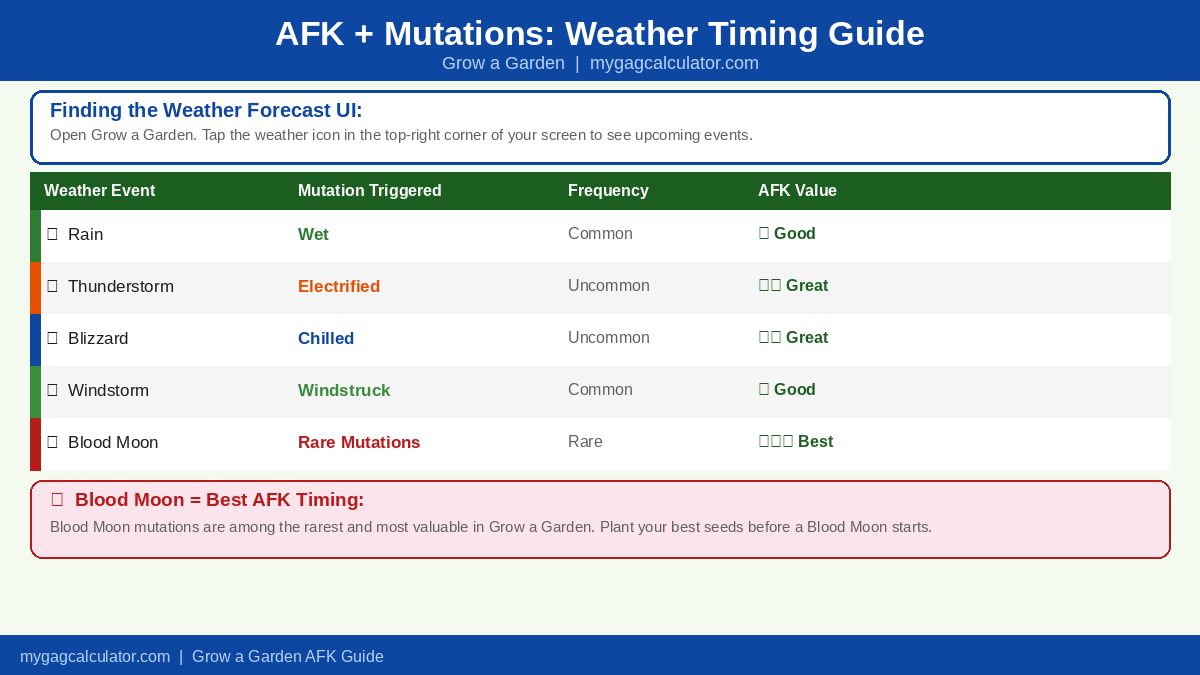
Before starting any AFK session, checking the weather forecast is one of the highest-impact things you can do. It takes about five seconds and it tells you exactly which mutations your crops are likely to pick up while you are away. Check our live weather tracker.
To find it, look for the weather icon in the top-right corner of your screen while in a Grow a Garden session. Clicking or tapping it opens the weather forecast panel, which shows the current active weather event (See our guide onAll Weather Events). and the upcoming events in the rotation. Each event is linked to specific mutations: Rain triggers Wet, Thunderstorm triggers Electrified, Blizzard triggers Chilled, and the Blood Moon event can trigger rare and high-value mutations that do not appear during standard weather. If a high-value weather event is active or coming soon, that is the signal to plant your best seeds before you walk away.
| Best Time to Start an AFK Session: Plant just before a Rain or Thunderstorm event for Wet and Electrified mutations. Planting before a Blood Moon is even better. Blood Moonmutations are among the rarest and most valuable in the game and they only apply during that specific event window. A crop that sits through a full Blood Moon cycle while you sleep can be worth significantly more Sheckles than the same crop harvested during normal weather. |
The 4 AFK Methods at a Glance
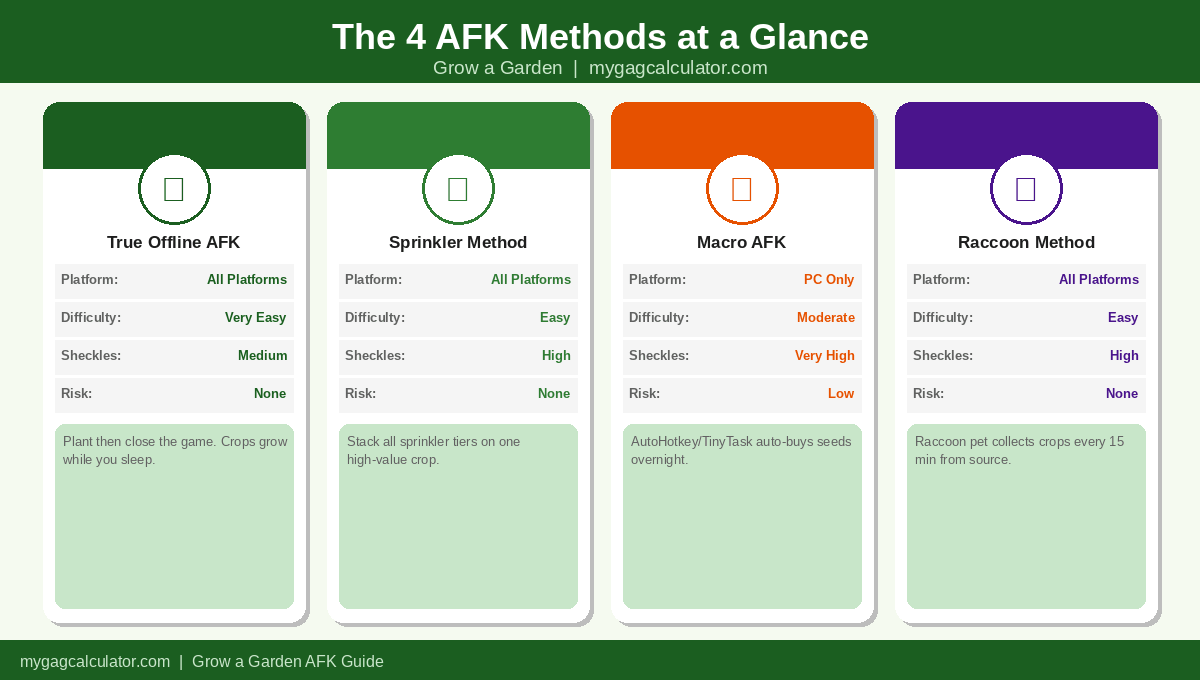
Here is a quick comparison of all four methods before we go through each one in detail.
| Method | Platform | Difficulty | Sheckle Potential | Risk |
| True Offline AFK | All (PC, Mobile, Console) | Very Easy | Medium | None |
| Sprinkler Method | All | Easy | High | None |
| Macro AFK | PC only | Moderate | Very High | Low to Medium |
| Raccoon Method | All | Easy | High | None |
Method 1: True Offline AFK (No Tools Needed, Works on Every Platform)
This is the most beginner-friendly approach and it requires absolutely nothing beyond planting seeds and closing the game. Crops in Grow a Garden continue to grow even after your session ends. This is a confirmed, intentional mechanic from Splitting Point Studios. Rarer seeds take longer to reach full size, but they are worth far moreSheckles at harvest, making overnight offline sessions a reliable way to build wealth consistently over time.
Where to Find the Best AFK Crops and How Often They Appear
All seeds are purchased from the Seed Vendor NPC located near the entrance of your garden plot. The shop does not carry every seed at all times. It refreshes its stock on a rotating timer, typically every few minutes, and the available selection changes with each restock. High-rarity seeds like Dragon Fruit, Beanstalk, and Moon Melon appear much less frequently than common ones. If you log in and do not see the seed you want, wait for the next restock or check back in a few minutes. The stock rotation is random within rarity tiers, so patience is part of the strategy when preparing for a big AFK session.
Best Crops to Plant Before Going Offline
| Crop | Rarity | Shop Frequency | Why It Works for AFK |
| Moon Melon | Rare | Occasional | Long grow time, solid base value; good option when Dragon Fruit is not in stock |
| Dragon Fruit | Legendary | Infrequent | High Sheckle yield; size mutations from sprinklers push value dramatically |
| Beanstalk | Mythical | Rare | One of the highest base values in the game; worth the extended grow time |
| Sugar Apple | Rare | Occasional | Reliable mid-game crop; holds value well across multiple mutation types |
| Pineapple | Uncommon | Common | Faster grower with decent returns; best for shorter AFK sessions |
How Offline AFK Connects to Mutation Farming
Leaving your crops in the ground overnight does not just let them grow. It also exposes them to more weather events. Rain, Thunderstorms, Blood Moon events, and Blizzards trigger mutations like Wet, Electrified, Chilled, and Windstruck automatically while you are away. These mutations stack and increase the Sheckle value of your crops without any input from you. Offline AFK is not just a growth strategy. It is also a passive mutation farming strategy, and that distinction separates casual players from efficient ones.
Method 2: Sprinkler Method (Passive AFK, Stay Online)
The Sprinkler method lets you stay online without actively doing anything while your crops grow to sizes far beyond normal. Jandel and the team at Splitting Point Studios have confirmed they do not intend to patch this, making it a fully safe and stable long-term approach. The method works by stacking one of each Sprinkler tier around a single high-value crop. When multiple tiers overlap on the same plant, they compound each other’s effect, pushing the fruit to a size and Sheckle value that normal growth alone cannot reach.
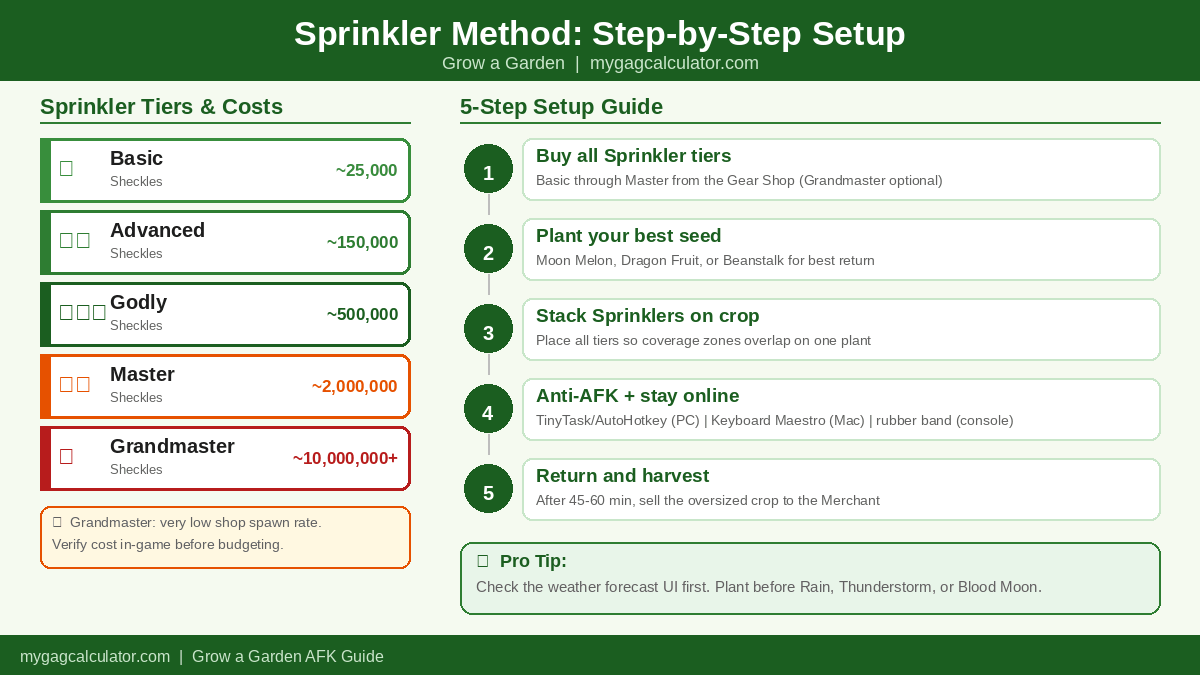
Sprinkler Tiers, Costs, and What Each One Does
| Sprinkler | Approx. Cost (Sheckles) | Primary Benefit |
| Basic | 25,000 | Boosts base growth speed; the entry-level starting point |
| Advanced | ~150,000 | Increases fruit size multiplier on top of Basic |
| Godly | ~500,000 | Adds mutation chance boost alongside continued size stacking |
| Master | ~2,000,000 | Strong size and growth stacking; approximately 1.4% shop spawn rate |
| Grandmaster | ~10,000,000+ | Highest tier available; maximum size and mutation stacking effect; very low shop spawn rate |
| Note: The Grandmaster Sprinkler has an extremely low shop spawn rate and costs significantly more than the Master tier. The Sprinkler method works very well with Basic through Master. Adding Grandmaster when you can afford it pushes results further but it is not required to get strong results from this method. The cost figures above reflect current community estimates. Verify in-game before budgeting for a purchase. |
Sprinkler Method Step-by-Step Setup
- Purchase one of each Sprinkler tier from the Gear Shop, starting with Basic and working up to Master. Add Grandmaster if your Sheckle balance allows.
- Plant your target seed. Moon Melon, Dragon Fruit, and Beanstalk produce the strongest returns here.
- Place all Sprinklers as close to the crop as possible so their coverage zones fully overlap on the plant.
- Stay in the Roblox session. Use your platform anti-AFK method below to prevent the idle kick.
- Return after 45 to 60 minutes. Harvest the crop and sell it to the Merchant for the increased Sheckle return.
Anti-AFK Kick Prevention by Platform
Roblox removes idle players after roughly 20 minutes of no input. Here is how to prevent that on each platform.
PC (Windows):
- Open TinyTask from therealtinytask.com. Record a tiny mouse movement, enable Continuous Playback in preferences, and set your stop hotkey to F8.
- Alternatively, an AutoHotkey loop that moves the mouse one pixel every 10 minutes handles this with zero interaction.
- Mac users can use Keyboard Maestro to run the same type of timed cursor movement loop.
Mobile (iOS and Android):
- Disable automatic display timeout inside the Roblox app settings.
- Keep your device plugged in. Battery saver mode overrides display settings on many devices.
- A lightweight tap automation app can send a periodic touch input to maintain session activity.
Console (Xbox and PlayStation):
- Wrap a rubber band loosely around one thumbstick so it applies constant light pressure and keeps the controller active.
- Set the controller auto-off timer to its longest option in your system power settings before starting.
Method 3: Macro AFK (Automated Buying and Planting, PC Only)
A macro is a script that simulates keyboard and mouse inputs automatically. In Grow a Garden, macro AFK goes further than just staying online. It actively visits the Seed Vendor and Gear Shop, purchases your chosen items, and loops continuously. This is the highest-effort setup of the four methods but also the one that produces the highest resource volume over a long overnight session.
VirageRoblox was the original community creator who developed and popularized the AutoHotkey macro approach for Grow a Garden, and most current community macros trace their roots to that original work. Cozy_Toad has since released an updated version through their own community Discord that is actively maintained for the current game version. TinyTask is the no-code alternative that beginners can get running in a few minutes by recording their own in-game actions.
Understanding the Seed Vendor Restock Before You Run a Macro
The Seed Vendor does not have unlimited stock. Itrefreshes its available seeds on a rotating timer, and between restocks the shop may show nothing that matches what your macro is trying to buy.
When your macro attempts to purchase a seed that is not currently in stock, it will either skip the purchase and loop again or stall depending on how the macro is configured. Most community macros handle this gracefully by looping back to check again on the next cycle.
However, if you configure your macro to target only a single rare seed like Beanstalk, you may come back to find it spent the entire night looping without buying anything because that seed never appeared in stock. The practical solution is to configure your macro to target a spread of seeds across different rarity tiers, not just the single most expensive one. This way the macro always has something to buy on every restock cycle.
| Macro Seed Selection Strategy: Set your macro to buy the most expensive seed currently in stock on each loop rather than targeting one fixed seed. Most updated AHK macros from the community support a priority list setting where you rank seeds and the macro buys the highest available one per cycle. Use this feature if it is available in your chosen macro. |
Setting a Sheckle Buffer Before Your Macro Session
Running out of Sheckles mid-session is the most common macro problem and one that catches nearly every player the first time. Your macro will keep running perfectly, looping through the shop, finding seeds in stock, attempting purchases, and then failing silently because your balance hit zero. You come back after eight hours to find your inventory is empty.
Before starting any macro session, set a minimum Sheckle buffer in your head or in the macro settings if the option exists. A practical rule is to never start a macro session with less than 500,000 Sheckles available. For overnight sessions targeting Legendary or Mythical seeds, a buffer of 2,000,000 or more is a safer floor. Check your balance before you step away and top it up if needed by selling a few harvested crops first.
| Common Mistake: Do not start a macro with a low Sheckle balance thinking “it will buy a few seeds and then stop.” Macros loop continuously. If the shop restocks a rare seed and your balance cannot cover it, that purchase opportunity is permanently missed. Buffer generously. |
AutoHotkey 2.0 Setup (PC Only, Best Results)
- Download and install AutoHotkey version 2.0 from autohotkey.com. Use v2.0 specifically, not the legacy 1.x version, as current GaG macros are written for the newer syntax.
- Join the Grow a Garden community Discord where Cozy_Toad distributes the macro. Download the .zip file from the macro channel and extract it to your desktop.
- Double-click the file labeled “RUN THIS V2” inside the extracted folder to open the macro interface.
- Before starting, configure Grow a Garden: equip your Shovel in one hotbar slot, place your Recall Wrench in a second slot, and set your camera to Default Camera Mode in Settings.
- In the macro interface, select your target seeds, eggs, sprinklers, and gear items. If a priority list is available, rank seeds from most to least valuable.
- Verify your Sheckle balance is above your chosen buffer minimum. Then click Start Macro. You can dim or turn off your monitor but must not put the PC itself to sleep.
TinyTask Setup (Beginner-Friendly, No Coding Required)
- Download TinyTask from therealtinytask and open the application.
- Go into TinyTask preferences and turn on Continuous Playback. This single setting is what makes your recording loop forever. It is the most commonly missed step and the reason most first-time TinyTask setups fail.
- Set your Playback Hotkey to F8 so you can stop the macro instantly without searching for the window.
- In Grow a Garden, position your character at the Seed Vendor. Press Record in TinyTask, then manually complete one full seed-buying loop.
- Stop the recording after one complete loop. Press Play. TinyTask will now repeat your actions continuously until you press F8.
| TinyTask vs AutoHotkey:TinyTask is faster to set up and reliable for simple single-shop buy loops. AutoHotkey macros from the community support multiple shops, priority seed lists, egg purchases, and gear in one automated run. Start with TinyTask, then move to AHK when you want more control over what the macro buys. |
Is Using a Macro Bannable in Grow a Garden?
No confirmed ban wave has targeted macro users in Grow a Garden at the time of writing. The scripts simulate normal key presses and do not inject code, modify game files, or read game memory. The risk that does exist comes from other players in public servers who can report unusual automated behavior. Running macros on private servers removes this risk entirely. Check the GaG community Discord for any policy changes before starting a long session.
Method 4: Raccoon AFK Method (Passive Pet Farming, No Tools Required)
The Raccoon method uses the Raccoon pet’s passive ability to visit another player’s garden every 15 minutes and bring back a copy of one of their crops. The original player keeps their crop. When set up correctly in a private server with a second account or a friend, this becomes a fully passive income stream that runs without any active play from you. See our guide on Pet Abilities.
Private Server Cost and Setup
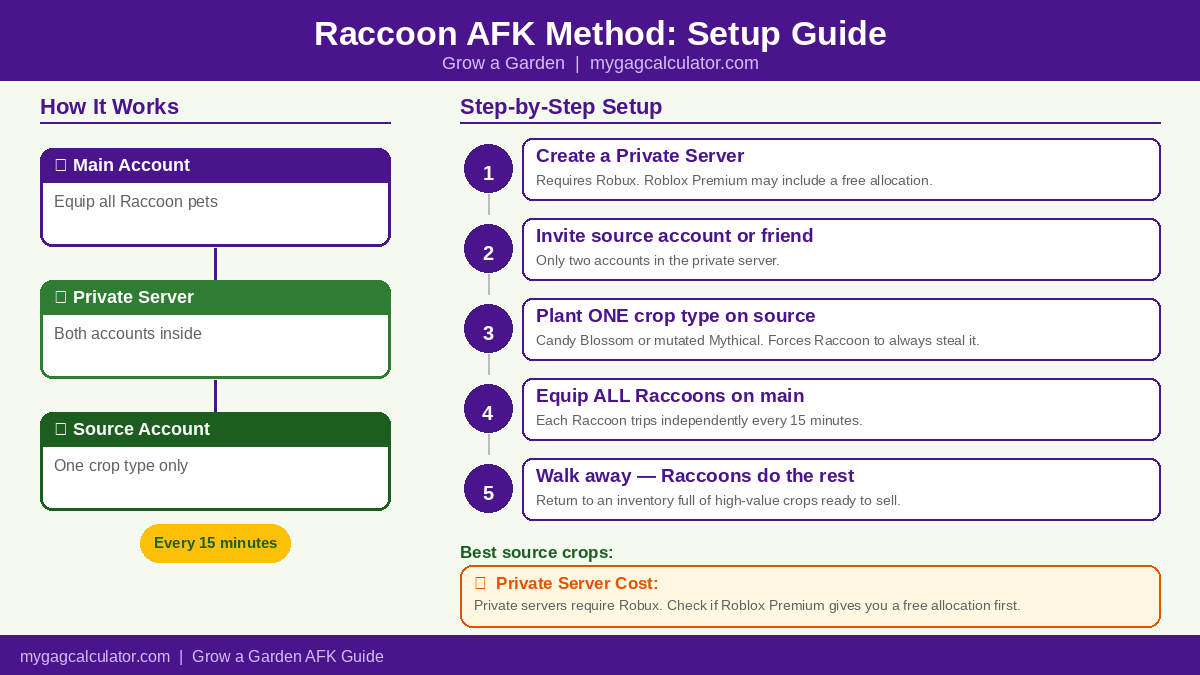
The Raccoon method requires a private server, and private servers in Roblox are not free. Creating one costs Robux, the platform’s premium currency. The exact cost varies but is typically a small monthly Robux fee per server. If you already have a Roblox Premium subscription, you may have a free private server allocation included. Check your account benefits before purchasing. If you have a friend who already owns a private server for Grow a Garden, you can ask them to host the session instead and avoid the cost entirely.
| Why a Private Server Is Essential:In a public server, your Raccoon will steal from random players and there is no guarantee it will find a high-value crop. In a private server with a single controlled crop on the source account, every Raccoon trip is guaranteed to return the exact crop you chose. The Robux cost pays for itself very quickly in Sheckle returns. |
How to Set Up the Raccoon AFK Method
- Create a private server for Grow a Garden or arrange to use a friend’s existing server.
- Invite only two accounts: your main account and either a trusted friend or your secondary Roblox alt account.
- On the source account, plant only one type of high-value crop, such as Candy Blossom or a well-mutated Mythical seed. A single crop type forces the Raccoon to steal that exact crop every cycle with no randomness.
- On your main account, equip every Raccoon pet you own. Each Raccoon makes an independent trip every 15 minutes, so three Raccoons means three crops collected per cycle.
- Leave both accounts running in the private server and walk away. Return later to find your inventory full of collected crops ready to sell to the Merchant.
Best Crops for the Source Account
| Crop | Why It Works |
| Candy Blossom | High base value, seasonal event availability; ideal Raccoon target for consistent Sheckle returns per cycle |
| Mutated Mythical crop | Any Mythical with a strong mutation (Wet, Electrified, Rainbow) pushes per-cycle value very high |
| Limited event plant | Event-exclusive crops carry a rarity premium; excellent choice if you have one from a past season |
| Dragon Fruit (mutated) | Widely accessible, solid base value, reliable fallback for most player inventories |
Dual-Account Raccoon Setup on the Same PC
Launch one account in the Roblox desktop app and the second through a separate browser window while logged into the alt account. The source account only needs to sit in the private server with its one crop planted. It requires no further input once the session starts. The Raccoon on your main account handles every trip automatically on its 15-minute cycle.
| Raccoon + Sprinkler Combo: Run the Sprinkler method on your main account’s own crops while the Raccoon collects copies from the source account in the background. Both systems run in parallel with no conflict. You get size-boosted crops from your sprinklers and a steady volume of Raccoon-collected copies at the same time. |
Pre-AFK Checklist: What to Do Before You Walk Away
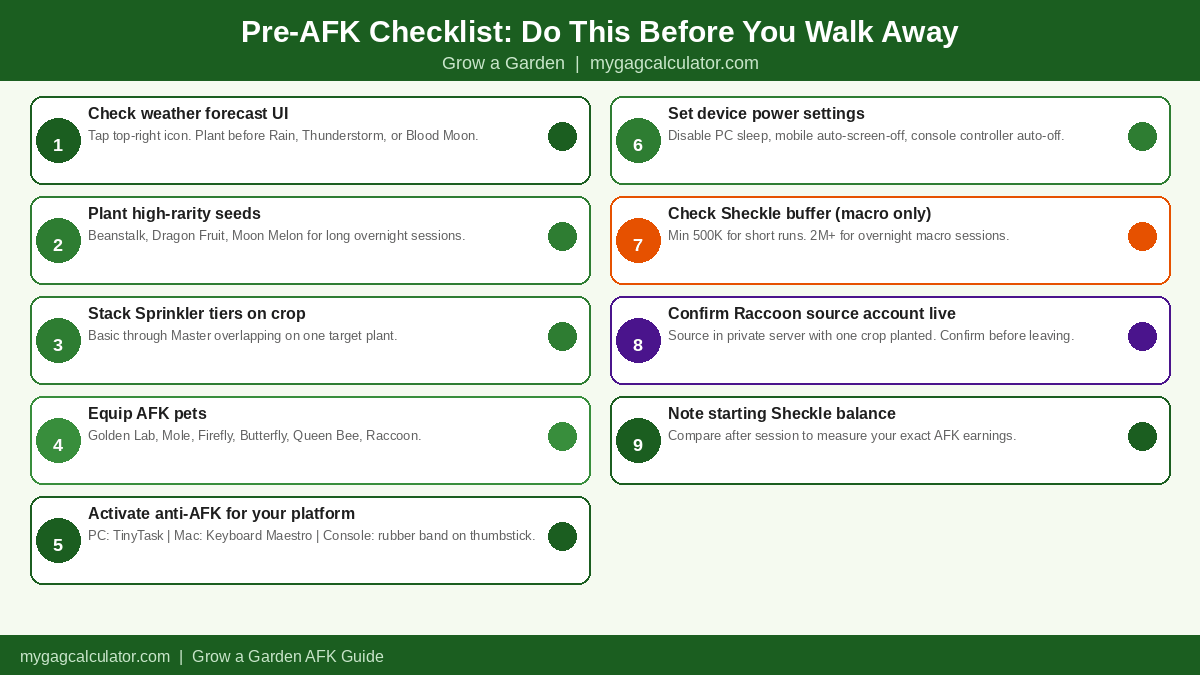
- Open the in-game weather forecast UI and check the upcoming event rotation. If a Thunderstorm or Blood Moon is approaching, plant before it arrives.
- Plant your chosen seeds. Prioritize high-value, long-grow-time crops for sessions of three hours or more.
- Stack all Sprinkler tiers within range of your target crop if running the Sprinkler method.
- Equip your best AFK-optimized pets: Golden Lab for passive resource finding, Mole for digging up additional items, Firefly and Butterfly for passive mutations, Queen Bee for cooldown resets.
- Activate your platform anti-AFK method if staying online: TinyTask or AutoHotkey on PC, Keyboard Maestro on Mac, display timeout disabled on mobile, rubber band on thumbstick on console.
- Adjust power settings: disable PC sleep mode, turn off mobile auto-display-off, disable console controller auto-off.
- If running a macro, verify your Sheckle balance is above your chosen buffer minimum before starting.
- If running the Raccoon method, confirm the source account is in the private server with its single crop planted.
- Note your current Sheckle balance before leaving for a clean before-and-after comparison when you return.
Which AFK Method Earns the Most Sheckles?
The right method depends on your current setup and how much time you want to invest in preparation. The table below gives an honest side-by-side comparison. For a personalized Sheckle estimate based on your specific seeds, sprinkler tiers, and mutations, use theGrow a Garden Calculator. Enter your crop and active sprinklers and the tool calculates your expected sell value before you commit to a session. See our Full Guide onHow to Earn Sheckles Fast?
| Method | Setup Time | Risk | Est. Sheckles/Hour | Best For |
| True Offline AFK | 2-3 min | None | Varies by crop and rarity | All players, especially beginners |
| Sprinkler Method | 10-15 min | None | High (crop-dependent) | Mid to late game players |
| Macro AFK | 20-30 min | Low to Medium | Very High (auto-purchase) | Experienced PC players |
| Raccoon Method | 10-15 min | None | High (per 15-min cycle) | Players with Raccoon pets |
| Calculator Tip: The Grow a Garden profit Calculator at MyGAGcalculator estimates your expected Sheckle earnings per crop based on seed rarity, active sprinkler tiers, mutation type, and current in-game market rates. Run your planned setup through it before walking away overnight to know exactly what return to expect when you come back. |
AFK Farming by Platform
How to AFK Farm on PC
PC players have access to all four methods. Macro AFK is exclusive to Windows because AutoHotkey and TinyTask only run on that operating system. Mac users can replicate the anti-idle function using Keyboard Maestro but the community macro scripts themselves are Windows-only. For overnight sessions on PC, the most efficient setup combines the Sprinkler method with a TinyTask anti-idle loop, the Raccoon method running on the alt account in a second browser window, and optionally a full macro if you are comfortable with the setup. Set your PC power plan to never sleep while plugged in. You can safely turn off your monitor without affecting any running session or macro.
How to AFK Farm on Mobile (iOS and Android)
Mobile players do not have access to macros but can use all three other methods. The biggest challenge is preventing the device from sleeping mid-session. Inside the Roblox app, disable automatic display timeout. Keep the device plugged in throughout any long Sprinkler or Raccoon session. For offline sessions, plant your seeds and close the app entirely. Crops will keep growing and accumulating weather mutations while the app is completely closed.
How to AFK Farm on Console (Xbox and PlayStation)
Console players can use True Offline AFK, the Sprinkler method, and the Raccoon method. Macros are not available. For the Sprinkler method, a rubber band on one thumbstick prevents the idle kick. Set your system controller auto-off timer to its longest option before starting. For the Raccoon method on console, you will need a friend with their own account since running two game instances on the same console is not possible.
Frequently Asked Questions
Does Grow a Garden grow crops when you are offline?
Yes. Crops in Grow a Garden continue to grow based on real time even after you close the game completely. This is an intentional mechanic confirmed by the developers at Splitting Point Studios. Plant seeds before you log off and return to fully grown crops ready to harvest and sell to the Merchant for Sheckles.
How long does it take for crops to grow AFK in Grow a Garden?
Grow times vary by seed rarity. Common seeds like Carrots and Strawberries mature in a few minutes. Rare seeds like Moon Melon and Sugar Apple take longer, often an hour or more. Legendary and Mythical crops like Dragon Fruit and Beanstalk can take several hours to reach full size, which is exactly why overnight offline AFK sessions are the most efficient way to grow them. The extended wait is worth it because these crops produce significantly more Sheckles at harvest than any common or uncommon seed.
What is the best AFK method in Grow a Garden for beginners?
True Offline AFK is the best starting point. Plant the highest-value seeds you can currently afford, check the weather forecast for an upcoming Rain or Thunderstorm, log off, and come back after several hours. No tools, no setup, no risk. Once you have saved enough Sheckles to buy the Basic through Master sprinkler tiers, the Sprinkler method becomes the next step up for noticeably higher returns.
What is the Sprinkler method in Grow a Garden?
The Sprinkler method places one of each Sprinkler tier, from Basic through Grandmaster, around a single high-value crop while you stay in the Roblox session. The stacked tiers compound each other and push the fruit to a much larger size than normal growth produces, increasing its Sheckle value significantly when sold. Splitting Point Studios has confirmed they do not plan to patch this method.
What is the Raccoon method in Grow a Garden?
The Raccoon method uses the Raccoon pet’s passive ability to visit another player’s garden every 15 minutes and bring back a copy of one of their crops. Set up in a private server with a single high-value crop on a second account, the Raccoon always steals that specific crop every cycle. The original player keeps their crop. This gives you a steady passive income of high-value items without any active play required.
How do I stop Roblox from kicking me for being AFK in Grow a Garden?
Roblox kicks idle players after roughly 20 minutes of no input. On PC, use TinyTask or AutoHotkey to send a small mouse movement every few minutes. On Mac, Keyboard Maestro handles the same task. On mobile, enable keep-screen-on in Roblox settings and keep the device charging. On console, wrap a rubber band loosely around one thumbstick to maintain constant controller input and set the controller auto-off to its longest option.
Can you get banned for using an AFK macro in Grow a Garden?
No confirmed ban wave has targeted macro users in Grow a Garden at the time of writing. The scripts simulate standard key presses and do not modify game files or access memory. Running macros on private servers removes the main risk of being reported by other players in public sessions. Always check the current GaG community Discord for any developer policy updates before running a long session.
What pets are best for AFK farming in Grow a Garden?
The best AFK pets are Golden Lab for passive resource finding, Mole for digging up additional items during a session, Firefly and Butterfly for passive mutation application over time, and Queen Bee for resetting pet cooldowns faster. The Raccoon is the most powerful AFK pet overall when set up correctly in a private server with the dedicated source account method.
Does AFK farming help with getting mutations in Grow a Garden?
Yes. Crops that remain planted through weather events like Rain, Thunderstorms, Blood Moon, and Blizzards automatically pick up mutations such as Wet, Electrified, Chilled, and Windstruck. Timing your AFK sessions around the weather forecast is one of the highest-impact passive optimizations in the game. A crop that sits through a Blood Moon event while you sleep can arrive at a Sheckle value far above what it would have reached through growth alone.
What is the difference between the Sprinkler method and the Raccoon method in Grow a Garden?
The Sprinkler method maximizes the size and Sheckle value of one crop through a single large sell. The Raccoon method builds volume over time by collecting copies of high-value crops from another garden every 15 minutes. Many experienced players run both at once: sprinklers on their own main crop while the Raccoon collects bonus crops from the source account in the background.
How much Sheckle balance should I have before starting a macro session?
A minimum buffer of 500,000 Sheckles is a practical starting floor for shorter macro sessions. For overnight runs targeting Legendary or Mythical seeds, a buffer of 2,000,000 or more is safer. When your balance runs out mid-session the macro keeps looping but cannot complete any purchases, which means all overnight restock cycles are wasted. Buffer generously and check your balance before stepping away.